Shopify App Development Explained: From Idea to Launch in 2026

TL;DR
- Shopify apps extend store functionality and improve eCommerce experience
- Starts with idea validation, audience, and problem definition
- Built using APIs, frameworks, and modern tech stack
- Process includes development, testing, and launch phases
- Enables scalable growth and recurring revenue opportunities
What if your next revenue stream isn’t a new product but a Shopify App? As eCommerce continues to dominate global sales, B2B businesses can no longer afford to sit on the sidelines. In fact 40% of sales executives now consider eCommerce their most profitable channel. And at the center of this shift is Shopify- a platform that’s not just powering stores, but enabling entire ecosystems through apps.
But here’s the catch- building a successful Shopify app isn’t just about writing code. It’s about solving the right problem, choosing the right features, and navigating a development process that can quickly become overwhelming if not approached strategically.
From idea validation to App Store Launch, every step matters – and most businesses struggle to connect all the dots.
In this blog, we’ll simplify that journey. You’ll learn exactly how to build a Shopify app in 2026, what type of app makes sense for your business, and how to turn your idea into something merchants actually use-and pay for.
Shopify App Development in 2026 : Everything You Need to Know
Developing a Shopify app entails developing solutions with a clear purpose and a smooth integration with the Shopify ecosystem. Enhancing the Shopify experience through custom functionality is the same whether you’re creating a private tool to address your own business issues or releasing a public application for thousands of merchants in the App Store.
What makes Shopify app development crucial?
With a compound annual growth rate (CAGR) of 14.5%, the global B2B eCommerce market is predicted to reach $36.16 trillion by 2026. The main reason why so many businesses want to use Shopify app development is the enormous growth in the eCommerce industry.
Additionally, companies can facilitate a smooth shopping experience by using the Shopify app. This guarantees higher conversions and enhances the general customer experience.
Businesses in a variety of sectors are now developing apps and taking advantage of Shopify’s ability to facilitate international trade. Additionally, setting up a Shopify store for your company makes sense if you want to take advantage of the growing eCommerce market. But it’s crucial to know what kinds of apps Shopify offers before making a decision.
Public vs Custom Shopify Apps: What’s the Difference?
Shopify offers two major types of apps,
- Public Shopify Apps: Any merchant can use these apps since they are made to be distributed via the Shopify App Store. These applications frequently solve typical eCommerce problems and assist in making money through usage-based pricing, one-time fees, or subscription fees.
- Custom Shopify Apps: These applications are typically created for internal use within businesses or for particular merchants. It takes into account a company’s particular operational needs. These apps stay confidential within a company and are not available on the Shopify App Store.
Consider Promatics Technologies, which provide Shopify apps that can be customized to meet particular business requirements. It offers public and custom apps that are available on the Shopify App Store.
Public Apps vs. Custom Apps Comparison
| Aspect | Public Apps | Custom Apps |
| Distribution | accessible to all merchants via the Shopify App Store | Private, used only by a specific merchant or organization |
| Target Audience | Broad market addressing everyday eCommerce needs | Single business with unique operational requirement |
| Revenue Model | Subscription fees, one-time purchases, or usage-based pricing | Internal investment or fixed development cost |
| Development Complexity | Must meet Shopify app review guidelines and standards | Flexible development aligned with specific business needs |
| Maintenance | Ongoing updates required for all users and and Shopify API changes | Maintenance focused on a single merchant’s requirements |
| Scalability | Built to serve thousands of merchants simultaneously | Optimized for specific scale and performance needs |
| Time to Market | Longer due to the app review process and market positioning | Faster deployment for immediate business use |
| Customization | Restricted to features that appeal to a wide range of users | Fully customizable to unique business process |
Your business goal will determine whether you choose to develop a custom or public Shopify app. A public app is the best choice if the objective is to create a SaaS company that can manage transactions across several Shopify merchants. For instance, you can use Shopify’s Frequently Bought app to make product recommendations.
On the other hand, a custom development approach makes more sense if your objective is to build a Shopify store that supports particular features or functionality. You now know what kinds of apps you can make. However, a number of factors must be taken into account before deciding to create a Shopify app.
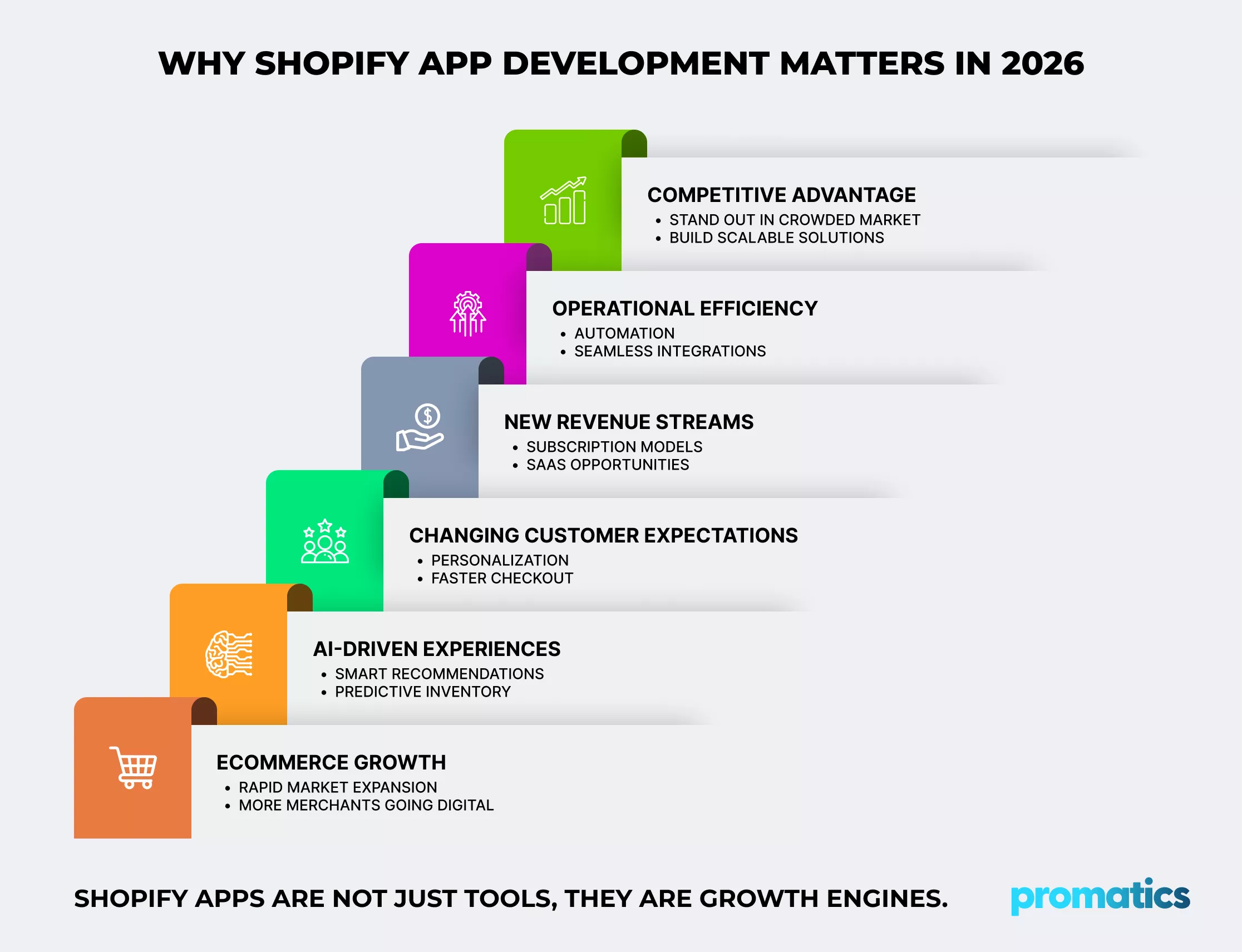
Why Build a Shopify App in 2026?
Building a Shopify app in 2026 is not just about adding new features to your store. It’s about creating a more efficient, flexible, and future-ready eCommerce experience.
A well-designed Shopify app allows businesses to go beyond standard store capabilities. Whether it’s enabling smoother payments, managing inventory more effectively, or delivering more personalized customer experiences, apps play a key role in shaping how modern eCommerce operates.
At the same time, the market is evolving quickly. Customer expectations are higher, competition is stronger, and businesses need solutions that can adapt just as fast. This is where Shopify apps make a real difference.
Here are some key advantages of building a Shopify app in 2026:
1. Continuous eCommerce Growth
Over the past ten years, the eCommerce market has grown steadily and quickly. Apps that address the particular requirements of customers are necessary to take advantage of this opportunity and ride the eCommerce Wave. You can personalize the shopping experience with Shopify app development. It will allow you to take advantage of the steadily expanding eCommerce market and increase revenue.
2. AI-Based eCommerce Demand
Through demand forecasting, predictive inventory, and intelligence recommendations, AI is already revolutionizing the eCommerce experience and influencing eCommerce market trends. By incorporating these features into your store, you can improve customer satisfaction while also changing the way you run your business.
Even during the holiday season, stockouts can be avoided by using predictive capabilities. This indicates that there aren’t many interruptions. You can incorporate these features into your online e-commerce store by using Shopify app development.
3. Changing Merchant Needs
In 2026, merchants will have distinct requirements that call for features that adjust to shifting market conditions. Consider social commerce between retailers as an example. In 2026, more merchants are expected to integrate payments across social media to facilitate direct checkouts for products.
Robust Shopify apps are necessary to enable such checkouts by making sure that product stocks on your online store automatically sync with social commerce platforms.
4. Evolving Customer Demands
As new trends emerge, customer demands continue to change. Purchasing from live social media feeds has become increasingly popular in recent years. The creation of a specially crafted Shopify app is necessary to enable such transactions.
5. Overcoming Business Challenges & Market Gaps
Your eCommerce company can overcome certain obstacles with the aid of custom Shopify app development. For instance, modern e-commerce businesses must do more than just attract clients. Better margins must also be offered by these online retailers.
In a Deloitte survey, 47% of executives said that profitability is the main factor influencing operating margins. You can boost profitability and conversation rates with Shopify app development.
Understanding the need for a Shopify store is just the first step; the real challenge is figuring out how to create a Shopify application. This is the solution.
Step By Step Guide : How to Create a Shopify App in 2026
87% of merchants use at least one of the more than 15,000 apps available in the Shopify app store for their online eCommerce store. Furthermore, there are more than 2,709,441 active online stores on the platform.
This is a detailed tutorial on setting up a Shopify store.
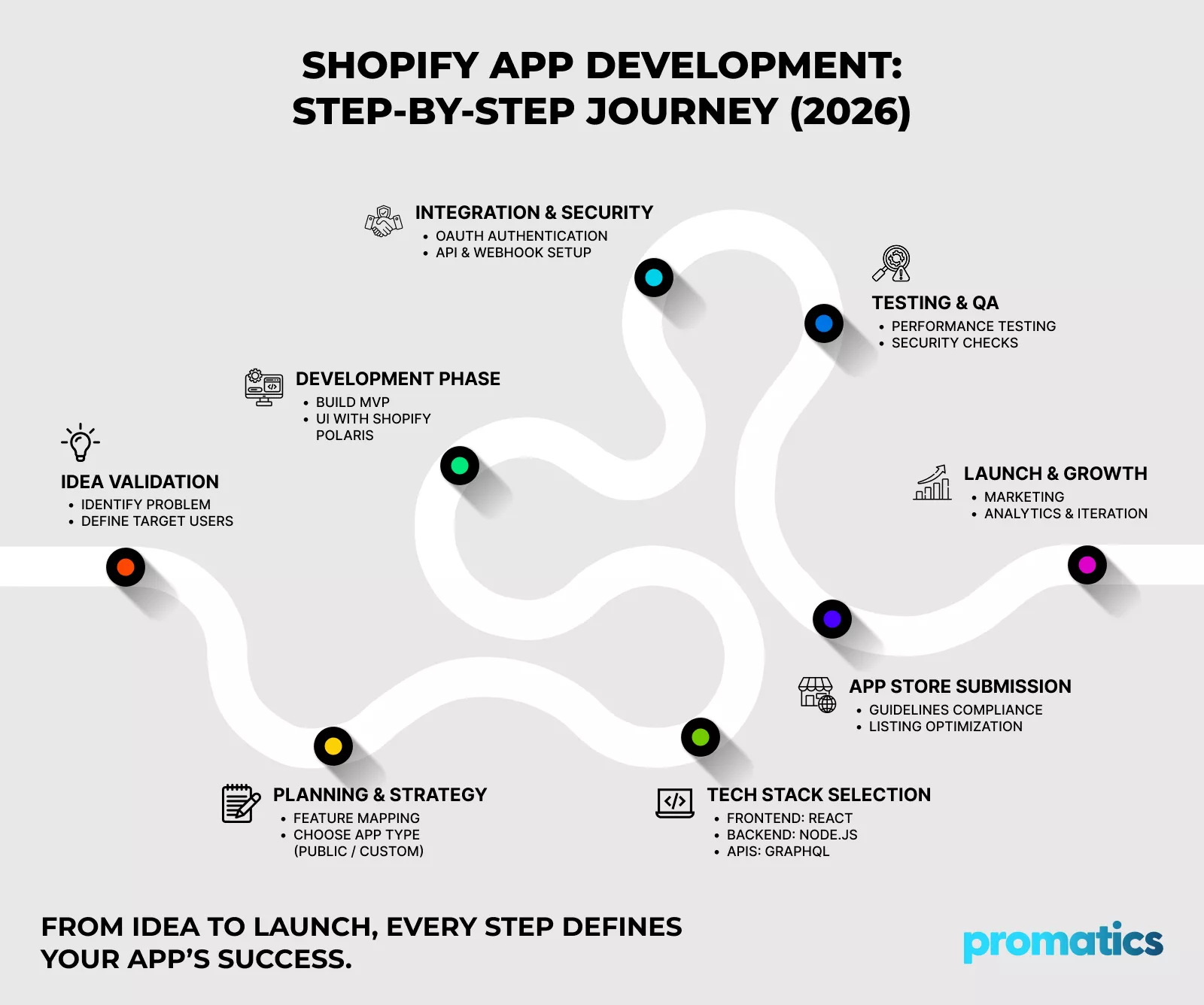
Step 1: Define Your App’s Purpose and Audience
The first step in developing a Shopify app is figuring out its objective. What problem has your Shopify store fixed? Who is the target audience? What tools and initiatives for development are needed? These are some important questions to answer.
You can design the features based on your target audience and the problem the app can solve. You can also look at Shopify app stores to identify weaknesses in the existing solutions. Look at the merchant reviews for each Shopify store. After conducting a thorough analysis, create a comprehensive user persona that includes gaps and pain points.
This user profile also includes information about business size, industry security standards, and specific operational challenges.
Pro Tip: Speak with five to ten actual Shopify merchants before writing a single line of code. Ask them to describe their daily routines and identify any areas of difficulty. The insights from these conversations will highlight features you might not have considered using market research alone, and early adopter relationships can act as powerful testimonials for the launch of your app.
Step 2: Set Up Your Shopify Partner Account and Development Store
By setting up a Shopify partner account, you can gain access to development tools, testing environments, and the app submission portal. Registering with a partner account allows you to create as many stores as you need to test your app.
Shopify app development tools allow you to replicate real merchant environments. They can be used to model workflows, test integrations, and identify issues before deployment. By setting up the development store with sample products, customer data, and order histories, you can mimic the operations of the target merchant.
Pro Tip: To A/B test your Shopify stores, create multiple storefronts and test them. For example, create a store with 50 products and another with 5,000 to test for performance issues and other scenarios.
Step 3: Choose the Right Tech Stack For Your Shopify Store
The technology stack you select for your Shopify app development can have an impact on your store’s scalability, performance, and maintenance. Numerous technologies and combinations of development methodologies are supported by Shopify.
You can use some of these key technologies for your Shopify app development project.
Recommended Tech Stack for Shopify App Development
| Tech Stack Comparison | |||
| Components | Recommended Options | Alternatives | Use Cases |
| Frontend Framework | React.js with Polaris | Vue.js | Dynamic UI with native Shopify design |
| Backend | Node.js + Express | Ruby on Rails | Scalable server-side processing |
| Database | PostgreSQL | MongoDB | Structured merchant data vs. flexible schemas |
| API Type | GraphQL | REST | Efficient data queries vs. simplicity |
| Hosting | AWS / Google Cloud | Heroku | Enterprise scalability vs. rapid deployment |
React and Shopify Polaris can be combined to easily incorporate Shopify’s design system. This guarantees that the interface of your app provides merchants with a native experience. There are several backend frameworks available, but if you want to manage webhook processing at scale, Node.js or Express may be the best options.
Pro Tip: Select a future-proof tech stack. Consider factors like documentation, community support, and optimization for Shopify app store integration instead of choosing the newest framework.
Step 4: Implement Authentication and API Integration
Authentication is the foundation of your app’s security and reliability. Begin by implementing OAuth 2.0 for merchant installation flows, which validates installation requests and securely exchanges authorization codes for access tokens. Every OAuth request requires HMAC validation to ensure it originated from Shopify, thereby protecting your app from unauthorized installations.
For embedded apps within Shopify Admin, implement session token authentication instead of traditional cookies, as Shopify requires this for all embedded applications. Session tokens must be passed with each request and validated on the server to maintain secure merchant sessions. Store access tokens securely on the backend using encrypted storage, and never expose them in client-side code, URLs, or logs. Integrate Shopify Admin API and Storefront API to access store data and functionality.
The Admin API manages products, orders, and store settings, while the Storefront API handles customer-facing interactions. Implement proper error handling for expired tokens, rate limits, and API disruptions to ensure your app gracefully handles these scenarios without breaking the merchant experience.
eCommerce online stores need to comply with PCI DSS and GDPR guidelines to ensure data security. Using Shopify app development, you can provide enhanced data protection.
Pro Tip – Build robust webhook handlers early in development to receive real-time updates about store events (orders, products, inventory changes). Webhooks reduce API calls and keep your app synchronized with merchant data, eliminating the need for constant polling, which helps you stay within Shopify’s rate limits.
Step 5: Build Core Features and User Interface
Design your app interface using Shopify Polaris, Shopify’s design system that ensures your app feels native within the Shopify Admin. Polaris offers pre-built React components that align with Shopify’s design patterns, thereby reducing development time while maintaining consistency across the platform.
Develop your app’s core features incrementally, starting with the Minimum Viable Product (MVP) that addresses the primary use case. Build features that directly solve merchant problems rather than adding functionality for the sake of completeness. Implement proper data validation, error messages, and loading states to provide precise feedback during user interactions.
Pro Tip – Implement comprehensive logging and error tracking from the outset, utilizing tools like Sentry or LogRocket. When merchants report issues, detailed logs help you diagnose problems quickly without requiring merchants to reproduce complex scenarios, significantly reducing your support burden and improving resolution times.
Step 6: Conduct Rigorous Testing and Quality Assurance
Testing is critical to delivering a reliable app that meets merchant expectations. Conduct functional testing across all features to ensure they work as intended under normal conditions. Test your app with various Shopify plans (Basic, Shopify, Advanced, Plus) to verify compatibility across different subscription tiers.
Here are some of the key tests you need to conduct,
- Perform integration testing to ensure that your app interacts correctly with Shopify APIs, webhooks, and third-party services. Test authentication flows thoroughly, including installation, reinstallation, and uninstallation scenarios.
- Conduct performance testing to ensure your app responds quickly, even under heavy load. Test with realistic data volumes and concurrent user scenarios that mirror actual merchant usage patterns.
- Implement security testing to identify vulnerabilities before launch. Validate that all OAuth flows use proper HMAC verification, access tokens are stored securely, and user inputs are properly sanitized to prevent injection attacks.
Pro Tip – Partner with 5-10 beta merchants from your target audience to test your app in real store environments before public launch. Provide them with dedicated support channels and incentivize detailed feedback through extended free trials or discounted pricing.
Step 7: Prepare for App Store Submission
Make sure your app satisfies all technical standards and guidelines before submitting it to the Shopify App Store. Examine Shopify’s extensive checklist, which addresses functional expectations, user experience criteria, and security standards. Your app must follow Shopify’s design guidelines, function dependably, and offer obvious value.
Make appealing app store listing materials, such as a clear app name, succinct description, feature highlights, and excellent screenshots that illustrate the benefits of your product. To help merchants use your app efficiently, write comprehensive setup instructions and make demo videos. Create terms of service, privacy policies, and support materials that adhere to legal standards.
Pro Tip: Depending on the complexity of the app, the review process may take 7–14 days, so submit it for approval at least 2-3 weeks before your intended launch date. To prevent delays, reply to reviewer comments and inquiries as soon as possible. Include a buffer period in your launch schedule because many apps acquire conditional approval that calls for small adjustments prior to final listing.
Step 8: Launch, Monitor, and Iterate
Execute your launch strategy to drive initial installations once it has been approved. Reach your target merchants by utilizing social media, content marketing, email marketing, and the Shopify partner network. Provide launch incentives to promote early uptake and collect feedback, such as extended free trials or reduced prices.
Use thorough analytics to keep an eye on user behavior, business data, and app performance. Monitor important performance metrics, such as the volume of support tickets, installation and activation rates, feature usage, and merchant retention. Prioritize focused optimization efforts by using analytics to identify user journey friction areas.
To improve your app’s performance and user experience, make constant improvements based on market trends, use data, and merchant feedback. Update frequently to add requested features, improve speed, and fix errors. Provide merchants with updates via release notes and in-app notifications to show your continued dedication to their success.
Pro Tip: Create a feature voting mechanism and public roadmap that lets merchants propose and rank new features. This openness guarantees that your development efforts are in line with real merchant demands rather than conjecture, builds trust, and minimizes redundant support inquiries about missing features.
How Promatics Technologies can Help you With Scalable Shopify App Development?
In 2026, building a shopify app isn’t just about adding functionality – it’s about creating a competitive edge. A well-built app can transform how your business operates, enhance customer experience, and unlock new revenue opportunities. But to truly capitalize on this potential, you need more than just an idea, you need the right strategy, technology, and execution.
With 18+ years of experience in delivering high performance eCommerce solutions, Promatics helps businesses turn ideas into scalable, market-ready Shopify apps. From identifying the right use cases and selecting the optimal tech stack to seamless development, integration, and launch, our team ensures every step is aligned with your business goal.
Our Extended Shopify & eCommerce Services
To ensure long-term success, we go beyond just app development and offer a complete ecosystem of services:
- Shopify Store Development & Design (Build conversion-focused, high-performing storefronts)
- Custom Shopify App Development (Tailored solutions for unique business workflows)
- Shopify API Integration Services (Seamless integration with third-party tools, CRMs, ERPs, and payment gateways)
- Shopify Migration Services (Move from legacy platforms to Shopify without data loss or downtime)
- Headless Commerce Development (Advanced, flexible architectures for scalable digital experiences)
- Shopify Performance Optimization (Improve speed, UX, and conversion rates)
- AI-Powered eCommerce Solutions (Predictive analytics, smart recommendations, and automation)
Whether you’re building a public app for the Shopify App Store or a custom solution tailored to your operations, we focus on creating solutions that are not just functional but impactful, scalable, and future-ready.
Conclusion
Shopify app development in 2026 is no longer optional. It is a strategic necessity for businesses aiming to stay competitive in an evolving eCommerce ecosystem. From identifying the right problem to building, testing, and launching a scalable solution, every step directly impacts the value your app delivers.
But the real question is, are you building just another app or a solution merchants genuinely need?
The difference lies in clarity, execution, and choosing the right development approach.
If you’re looking to turn your idea into a high-performing Shopify app or scale your existing store with powerful, custom functionality, this is the time to act.Connect with Promatics Technologies to build a Shopify app that not only launches but also scales, performs, and drives measurable results.
