Top 10 Mobile App Development Tools (2025 Edition)
TL;DR
- Comparison of Flutter, React Native, Android Studio, and Xcode.
- Best tools for Android, iOS, and cross-platform app development.
- Performance, scalability, and development speed differences.
- AI-powered app development and cloud-based development trends.
- Choosing the right mobile development stack for different business needs.
With over 95% US citizens owning at least one mobile device, having a functional and feature-rich mobile as the forefront of your business is now more important than ever. And with countless mobile app development tools in the market, there’s truly no excuse not to create one.
However, choosing the right mobile app development platform is not an easy job.
There are native tools, cross-platform tools, and no-code/low-code tools—all of them are geared toward developing different types of mobile apps.
The market has many tools. So many that if you try to inspect them one by one, they will make your head spin while wasting hours of your precious time.
Don’t worry. We have got you covered.
Here are the top ten mobile app development tools in 2025 that will make your app-building process quick, efficient, and cost-effective.
Why Choosing the Right Mobile App Development Tool Matters?
When you’re choosing the mobile app development tools, you’re making an investment that will determine your app’s performance, costs, UI, user engagement, and everything that matters.
That’s why you should consider the pros and cons of each development tool before making your final choice. Here are a few reasons why choosing the right tech stack for developing a mobile app matters:
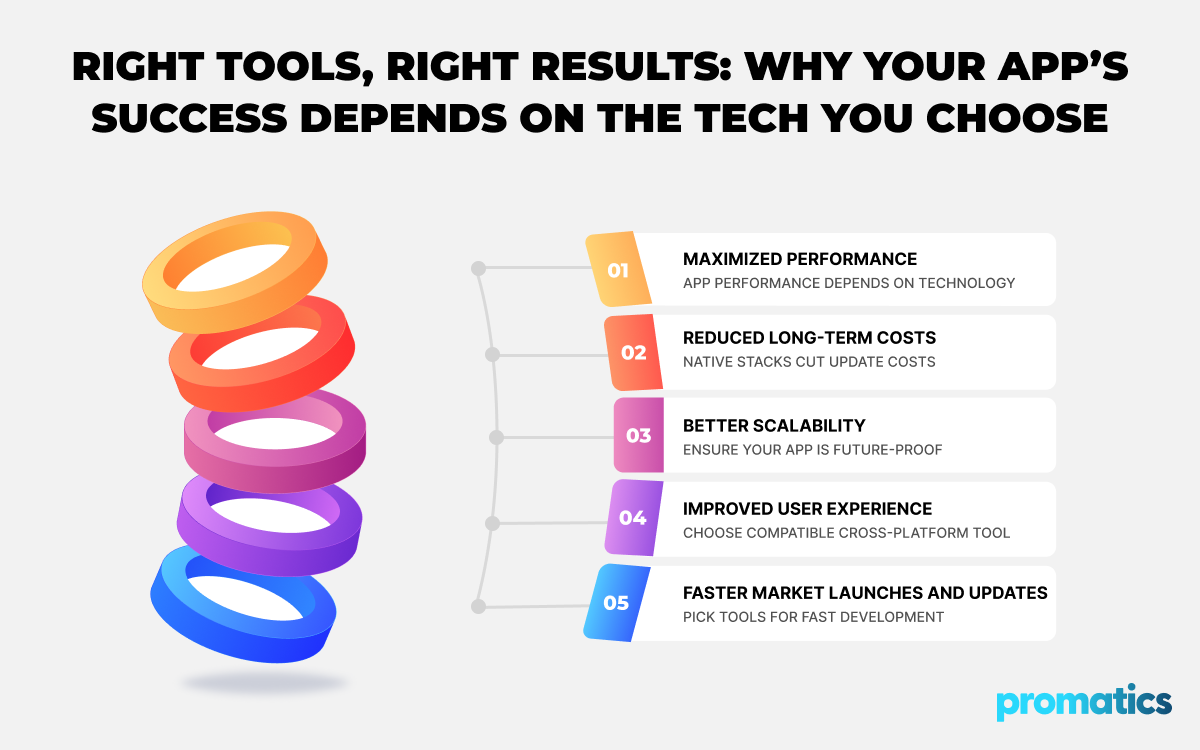
1. Maximized Performance
People want their mobile apps to be fast, efficient, and glitch-free. And these factors are highly dependent on the underlying technology.
By choosing a development tool that is compatible with specific platforms, you can maximize your mobile app’s performance and responsiveness at a lower cost.
2. Reduced Long-term Costs
Although initial development costs money, you shouldn’t forget about the ongoing costs
of updates, bug fixes, and scaling.
Some tech stacks, especially the native ones, can lower the costs of these updates in the long term.
3. Better Scalability
Whenever you have a mobile app developed by a company, ensure that it is designed to be future-proof. By choosing the right tech stack, you can scale and update your mobile apps more easily without disrupting the user experience.
4. Improved User Experience
You create apps to give users a better, smoother online experience. If your app gets sluggish, loads slowly, and looks bad, it will be abandoned sooner or later.
To ensure a high-quality user experience and avoid technical issues, you must choose a native platform or a compatible cross-platform development tool.
5. Faster Market Launches and Updates
When selecting a tech stack, always ensure that the development tool helps you build a complete product as quickly as possible.
For example, cross-platform mobile dev tools enable you to launch apps on multiple platforms at once and fix bugs more quickly.
Types of Mobile App Development Tools
We can divide all mobile app development platforms into three broad categories. They are native, cross-platform, and no-code/low-code app development tools.
Let’s see what each of them has to offer.
1. Native Tools
Native tools are designed to create mobile apps for a specific operating system, whether it’s Android or iOS. These platforms help you create mobile apps specific to each platform using their native coding languages and SDKs.
Pros:
- Smoother user experience
- Better performance on the native platforms
- Improved access to the devices with the native OS
Cons:
- Little to no support for creating a similar app for a different OS
- Additional development costs for separate platforms
2. Cross-platform Tools
With cross-platform mobile app development tools, you will only have to write the base code for your app once, and deploy the same code base to run the app on different OS.
Since you only need to write a single shared code base, apps developed with cross-platform tools usually have low maintenance costs and receive faster updates.
Pros:
- A single shared code case per app
- Wider overall reach
- Faster app development and deployment
Cons:
- App performance may not be as smooth as the native apps
- Possible platform-specific issues
3. No-Code/ Low-Code Tools
No-code/low-code development tools can help people to build their own apps with minimal coding or no coding at all.
This is especially true for the no-code tools, as they can help even non-developers create the apps they want by following native app templates.
These app development platforms with pre-built components and visual UI are perfect for those who want clean, simple, and functional mobile apps quickly.
Pros:
- Faster app development
- Lower development costs
- Usable by individuals with little to no coding experience
Cons:
- Fewer customization options
- Little room for app performance optimization
- Scalability issues
Top 10 Mobile App Development Tools
1. Flutter
Powered by Google, Flutter is an open-source, cross-platform UI mobile application development toolkit that can help you build Android, iOS, and web apps using a single codebase.
This UI app development platform has a rich library of customizable widgets and a reactive framework. These features will allow you to create highly customizable, user-friendly, clean mobile apps faster, which you can deploy across multiple platforms.
Key Features:
- Hot reload for instant preview of previous changes in the apps
- Shared codebase across multiple mobile OS
- Plenty of customizable widgets
- Dart language for smoother UI creation and app logic development
- High-performance apps with fast execution across all platforms
2. React Native
React Native is yet another powerful cross-platform mobile app development tool that relies on JavaScript and React to build highly responsive mobile apps.
Unlike other cross-platform dev tools, Reach Native can access the native APIs and components of iOS and Android OS to boost the app’s performance.
This makes it an ideal choice for businesses that want to create user-friendly, responsive, and feature-rich apps faster and at affordable costs.
Key Features:
- Code sharing across multiple mobile OS
- Hot reloading
- Comes with a large and active community
- Access to native components and APIs for better app performance
- Extensive React library for efficient, cost-effective coding
3. Android Studio
As Google’s official IDE for Android OS native app development, Android Studio is one of the most popular and important mobile application development tools.
Whether it’s writing code, testing, or debugging, this feature-rich platform can help you execute all the tasks in a streamlined manner with zero hiccups.
Android Studio is built on the IntelliJ IDEA platform, allowing its users to integrate and use various key functionalities and tools. With it, you can breeze through each app development process with little to no obstruction, ensuring a smooth and cohesive workflow.
Key Features:
- Smart code editor with refined code completion, analysis, and refactoring tools
- Android emulator and layout editor
- Real-time profiling and the Gradle build system
- Integrated testing framework for seamless unit and UI testing
- Jetpack integration
4. Xcode
Xcode is Apple’s official IDE for developing macOS web apps, and is one of the most popular platforms for developing iOS apps for iPhones and iPads.
Powered by Swift and Objective-C, this platform provides iOS developers with a complete set of tools for coding, testing, designing, and debugging iOS apps.
It can also seamlessly integrate with feature-rich code editors, simulators, and interface builders for a faster and more efficient development workflow and deployment.
Key Features:
- Drag-and-drop interface builder and intelligent code editor
- Powerful simulator for app testing
- Swift and Objective-C support
- An intuitive, graphical debugger for faster bug fixes and quality checks
- A complete suite of performance analysis tools
5. Bubble
Bubble is a popular no-code app-building platform that allows non-developers to develop complex mobile and web apps without writing a single line of code.
With its automated workflow builder and visual editors, you can create custom mobile apps with practical functions, rich features, ample database, and precise workflow. And you can do all this without typing a single line of code.
Just plan, simple, affordable, and efficient app-building with zero stress.
Key Features:
- Visual app builder with a drag-and-drop interface
- Automated workflow builder for creating complex logic and in-app workflow
- Database management and API integration for improved app functionality
- A rich marketplace with countless plugins for payments, analytics, and more
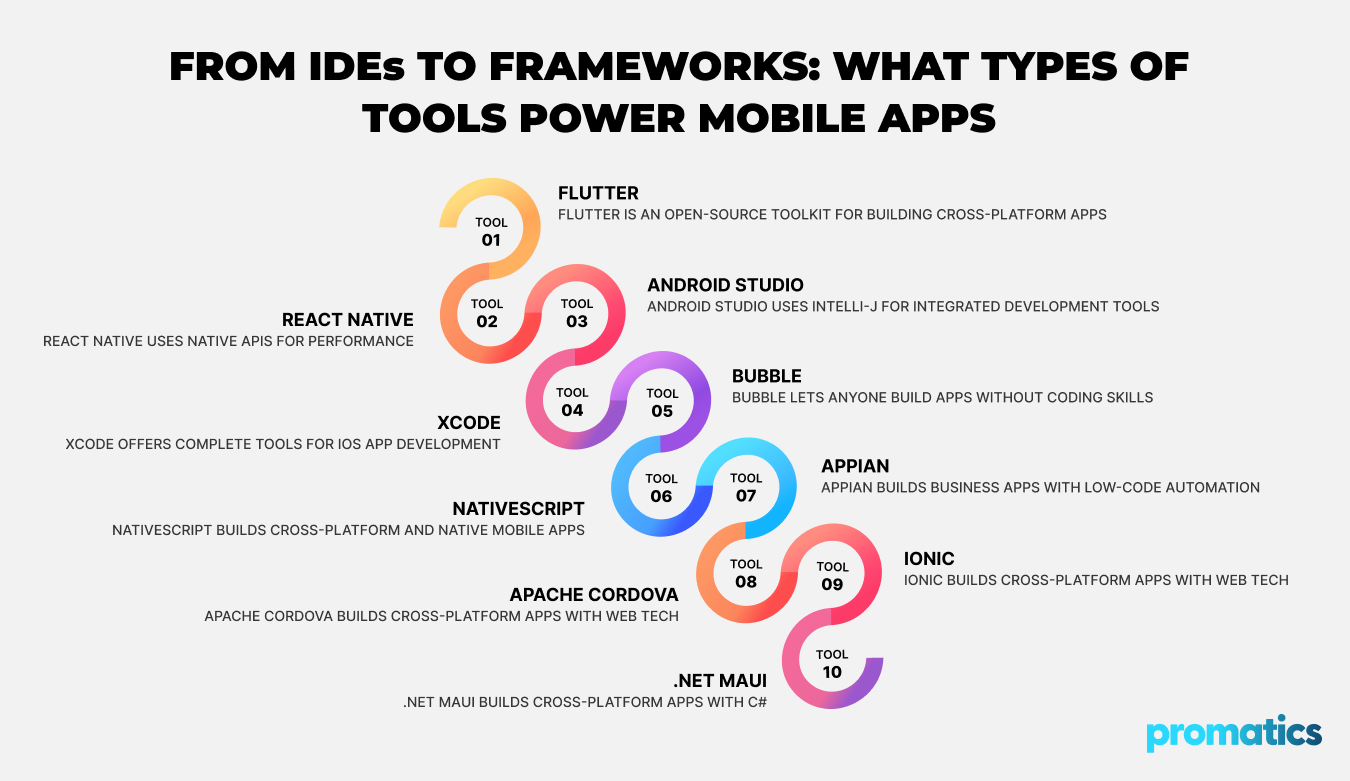
6. NativeScript
NativeScript is another popular open-source mobile and web application development platform that can help you build both cross-platform and native Android and iOS apps.
What’s more, you can even empower your mobile apps with Angular, JavaScript, CSS, Vue, and TypeScript when building them using this platform.
Due to its excellent support, API access, and wide variety of plugins, NativeScript can help coders reduce development time and costs.
This made it one of the most appreciated open-source cross-platform mobile app development tools amongst the developer circles of top global companies.
Key Features:
- Effortless integration with other JS frameworks like Vue and Angular
- Code sharing via a singular codebase
- Great backend support and highly active community
- Direct access to Android and iOS APIs
- Access to countless templates and plugins for a faster development process
7. Appian
As a low-code app development platform, Appian can help you build complex and functional business apps with an automated workflow.
It has many visual tools and seamless API integration options. Coupled with its minimal coding requirements, intuitive UI, and analytics, Appian makes the mobile app-building process noticeably faster and cost-effective.
If you’re looking to build apps with greater operational efficiency and fewer hassles, Appian is a perfect mobile app-building partner for you.
Key Features:
- Visual tools and workflow diagrams to develop apps with process automation
- Intuitive UI for creating user-friendly app designs
- Seamless integration options with the existing APIs and databases
- Real-time analytics for better performance monitoring and debugging
8. Apache Cordova
Apache Cordova, formerly PhoneGap, is an open-source app development platform that helps coders build cross-platform mobile apps using JavaScript, HTML, and CSS.
With this tool, you can design mobile applications that run in a web view. Additionally, Cordova can help you access many native device features via plugins.
This, in turn, makes your apps highly compatible with various mobile OS, eliminating the need to write separate code for different platforms.
Key Features:
- Uses standard, highly compatible web technologies like JS, HTML, and CSS
- Comes with a lot of plugins to help your app access native device features
- Cordova has an active and dedicated community
- Ever-growing plugin libraries
- Single codebase to deploy the app across various platforms
9. Ionic
Ionic is a 100% open-source, cross-platform app development tool that uses HTML, CSS, and JavaScript technologies to build mobile applications.
Whether you want to develop a native, cross-platform, hybrid, or progressive web app, Ionic can help you achieve it using a single shared codebase.
As long as you have a vision, this platform can help you design a high-performance, responsive mobile app. Plus, it will also help you integrate with Angular, React, and Vue to make the development process faster, better, and more efficient.
Key Features:
- Deployable across multiple platforms
- Open-source and rich tech stack integration options
- A rich set of useful UI components for easier mobile app development
- Simple and easy to learn
- Helpful commands to make the development process smoother via the Ionic CLI
10. .NET MAUI
.NET MAUI, an evolution of Xamarin, is a powerful cross-platform app-building tool that allows developers to create feature-rich applications using C#.
It integrates with Visual Studio to create a shared C# codebase and project system, which will help you build apps that work on all relevant native platforms, including Android, iOS, Windows, and macOS.
If you want to work with a platform that supports platform-specific APIs and maintains a high degree of code reuse, .NET MAUI may be your best choice.
Key Features:
- A single codebase that can be shared across all major mobile and desktop OS
- Native code compilation for enhanced performance
- Access to a wide range of APIs
- Visual Studio integration
Mobile App Development Tools for Different Use Cases
All mobile app development platforms are designed to assist us in app-building with minimal friction. However, not all these tools are the same.
Some no-code tools allow non-developers to create powerful apps without writing a single line of code. Meanwhile, others require extensive coding knowledge, but they provide more flexibility to develop custom apps with advanced features.
1. For Beginners
If you’re new to the mobile app development scene, you should pick a tool that will help you get familiar with the app-building process.
In this case, you should opt for user-friendly tools with rich widget libraries and pre-built features, such as Flutter and React Native.
Both of these tools feature a simple UI and enable cross-platform development with a single shared codebase. For new developers, these features are practically a godsend.
2. For Native Developers
If you have enough experience as an app developer under your belt and want to switch to something more advanced, you can become a native mobile app developer.
If you pick this path, Android Studio and Xcode are the best mobile app dev tools for you. For native Android app development, Android Studio is a solid choice. Meanwhile, Xcode offers plenty of rich features that will make iOS app development smoother.
3. For Cross-Platform Development
If you want to create a mobile app that functions well on both Android and iOS platforms without compatibility problems, choose a cross-platform app development tool.
Cross-platform mobile app development technologies, such as .NET MAUI and Apache Cordova, will help you write a single codebase.
This codebase can be shared across all relevant platforms, making updating and debugging apps easier and more cost-effective.
4. For No-Code Solutions
If you have no experience as a programmer but want to develop a feature-rich, functional app for your business, choose a no-code app development solution.
No-code solutions, such as Bubble, usually have a visual, drag-and-drop UI that helps you develop new apps without needing you to write a single line of code.
Key Trends in Mobile App Development—2025 and Beyond
With the advancement of relevant tech, the mobile app development industry is also experiencing subtle changes. Here are a few key trends you need to watch out for to stay up to date with the app development industry:
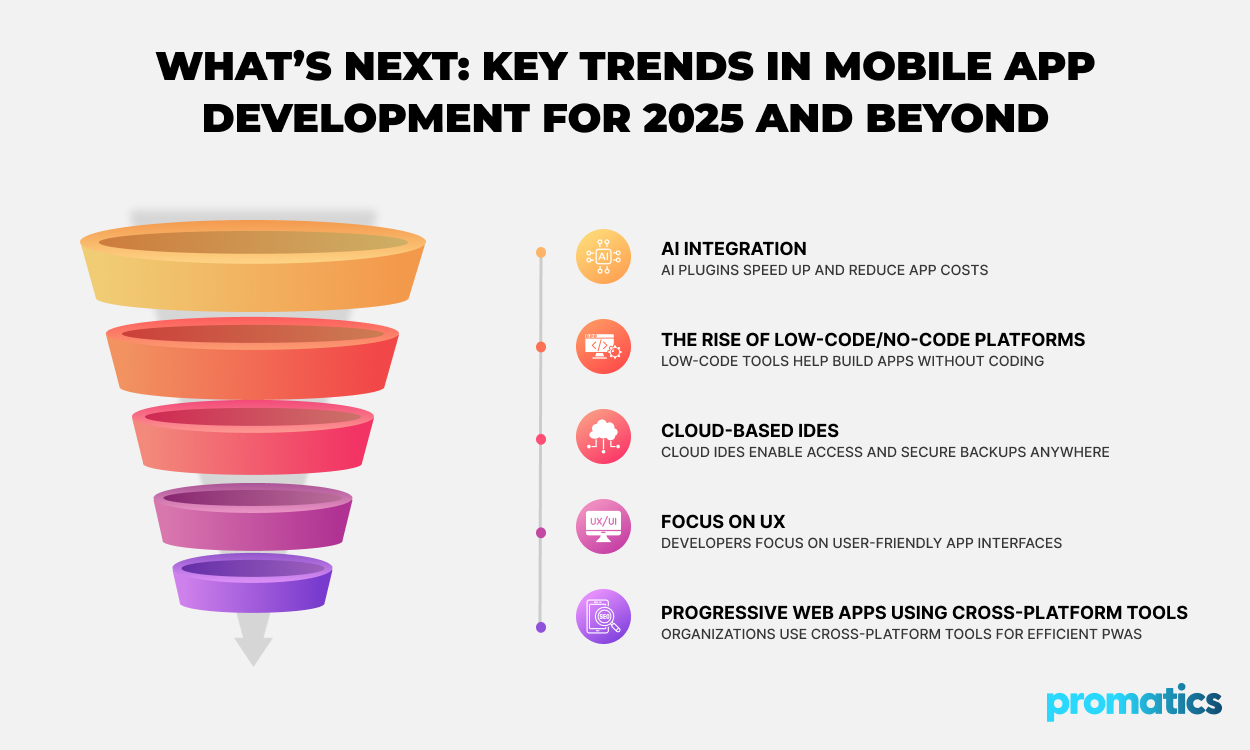
- AI Integration: Developers are integrating AI and ML algorithms to make apps smarter and provide better personalization. In fact, integrating relevant AI plugins during the development process can make app-building faster and more cost-effective.
- The Rise of Low-Code/No-Code Platforms: More and more organizations are using the low-code/no-code tools to build apps, which helps them build mobile apps with little to no coding experience. Although these platforms offer limited customization options, they can reduce development costs and time.
- Cloud-based IDEs: Many IDEs now offer cloud integration and backup options, making it easier to get access to your code from anywhere and at any time. They also keep your codebase safe with advanced backup options.
- Focus on UX: These days, mobile app developers are putting more emphasis on creating user-friendly, neat, and clean apps with intuitive user interfaces.
- Progressive Web Apps (PWAs) Using Cross-Platform Tools: Many organizations are picking cross-platform tools to build PWAs to make them more accessible, easy to update, and cost-effective.
Final Thoughts: Choosing the Right Tool for Your App
A mobile app should be user-friendly, intuitive, and feature-rich. It needs to meet the user’s expectations and perform well to help your business grow and thrive. To create such an app, you need an optimal mobile app development tool.
Whether you want to develop an Android, iOS, or cross-platform app, the app development tools we have mentioned above can help you fulfill your goals.
Take a look at them and compare their features to see which one meets your app development and business goals. By picking the right tool, you can create the app you desire quickly, efficiently, and in a more cost-effective manner.
Do you have no time to build your own mobile app? No worries.
As a leading software development company, Promatics India can help you build a custom mobile application that will help your brand connect with your customers.
Contact our mobile app development specialist today to see how we can develop a custom mobile app that will strengthen your brand and help your business grow.
