AI Copilot Development: A Complete Guide to Building Enterprise AI Assistants

TL;DR
- Define the use case: Identify a specific business problem and measurable goal.
- Choose the right architecture: Select suitable AI models, RAG, and integrations.
- Secure enterprise data: Apply access controls, data protection, and human oversight.
- Evaluate performance: Measure accuracy, task completion, adoption, and operating costs.
- Scale strategically: Validate a pilot before expanding across business functions.
The right enterprise AI copilot combines reliable data, secure integrations, and continuous evaluation to deliver practical business value.
Businesses are moving beyond basic AI chatbots toward intelligent assistants that can understand context, retrieve company information, and support everyday workflows. AI copilot development enables organizations to build assistants tailored to their operational needs, helping employees access information faster and reduce repetitive work.
From customer support and sales to software development and internal knowledge management, enterprise AI copilots can support a wide range of business activities. However, integrating a language model alone is not enough to create a reliable enterprise solution. Businesses must also consider data quality, system integrations, security, governance, usability, and long-term maintenance.
Choosing the right AI copilot development approach helps organizations align technical capabilities with measurable business outcomes.
Promatics Technologies offers AI and ML development services for businesses exploring intelligent applications and AI-powered solutions. This guide explains how enterprise AI copilots work, their business applications, essential architecture components, development stages, security requirements, and factors that influence implementation costs.
1. What Is an Enterprise AI Copilot?
An enterprise AI copilot is an intelligent assistant integrated into business applications and workflows. It uses AI models, organizational data, and connected tools to help users retrieve information, complete tasks, and make informed decisions.
Unlike a basic chatbot that primarily answers predefined questions, an enterprise copilot can work with internal knowledge sources and business systems, subject to the permissions and capabilities configured for it.
For example, a customer support copilot might retrieve relevant product documentation, summarize a customer’s previous interactions, and draft a response for an employee to review.
AI Chatbot vs. AI Copilot vs. AI Agent
| Feature | AI Chatbot | AI Copilot | AI Agent |
| Primary purpose | Answer questions | Assist with tasks | Execute defined goals |
| Data access | Configured knowledge sources | Contextual business data | Data and tools available to the agent |
| Human involvement | User reviews answers | User guides and reviews work | Depends on autonomy and risk |
| Typical application | FAQs | Employee and customer support | Multi-step workflow automation |
The key distinction is the level of assistance and autonomy. A copilot generally supports a person who remains involved in the workflow, while an agent may execute multiple steps independently. More autonomous capabilities require stronger safeguards, testing, and monitoring.
2. Business Use Cases for Enterprise AI Copilots
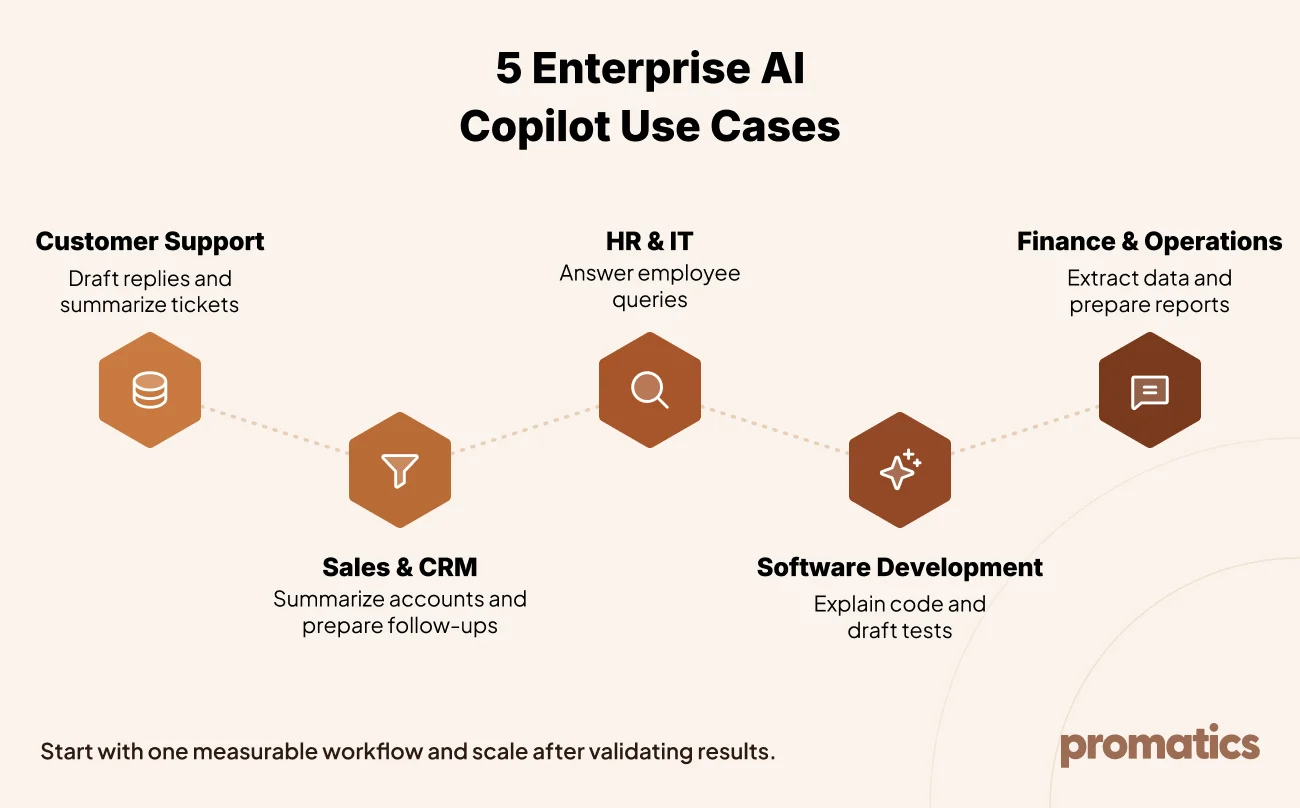
AI copilots can create value when employees spend substantial time searching for information, summarizing documents, drafting routine communications, or moving data between systems.
The best starting point is usually a specific workflow with frequent usage, accessible data, and measurable outcomes.
| Business function | Copilot application | Potential benefit |
| Customer support | Draft replies and summarize tickets | Faster response preparation |
| Sales and CRM | Summarize accounts and prepare follow-ups | Less manual research |
| HR and IT | Answer policy questions | Easier access to internal information |
| Software development | Explain code and draft tests | Support for development workflows |
| Finance and operations | Extract information and prepare reports | Reduced repetitive work |
Before investing in AI copilot development services, evaluate four factors:
- Frequency: How often do employees perform the task?
- Business impact: How much time or effort does the process consume?
- Data readiness: Is the required information accessible and reliable?
- Risk: What happens if the copilot makes a mistake, and who will review its output?
A focused workflow with clear ownership is generally a better starting point than an organization-wide assistant with undefined objectives.
3. Choosing the Right AI Model and Development Approach
Selecting an AI model requires more than comparing benchmark scores. Businesses should evaluate candidate models against their own tasks, data, performance requirements, and security expectations.
Key AI model selection criteria
- Task performance: Test models using representative business questions and documents.
- Latency and cost: Evaluate response speed and expected usage expenses.
- Context handling: Assess the model’s ability to process relevant documents and structured information.
- Tool use: Test whether it can reliably interact with approved business functions.
- Data privacy: Review retention policies, processing arrangements, and model-training terms.
- Flexibility: Consider whether the architecture can accommodate future model changes.
Model pricing, capabilities, and service limits change over time. Validate available options during project discovery rather than relying on assumptions.
Should You Buy, Extend, or Custom-Build an AI Copilot?
| Approach | Best suited for | Main consideration |
| Buy a packaged copilot | Standard workflows within an existing software ecosystem | Faster implementation, but less customization |
| Extend an existing platform | Organizations needing additional integrations or tailored workflows | Depends on platform capabilities and licensing |
| Build a custom copilot | Specialized products and complex enterprise workflows | Greater control, with more engineering and maintenance |
The right approach depends on business requirements, existing technology, integration needs, and the level of customization required. Start with the simplest architecture that meets the use case, then expand when testing and business needs justify additional complexity.
4. How Retrieval-Augmented Generation (RAG) Powers Enterprise AI Copilots
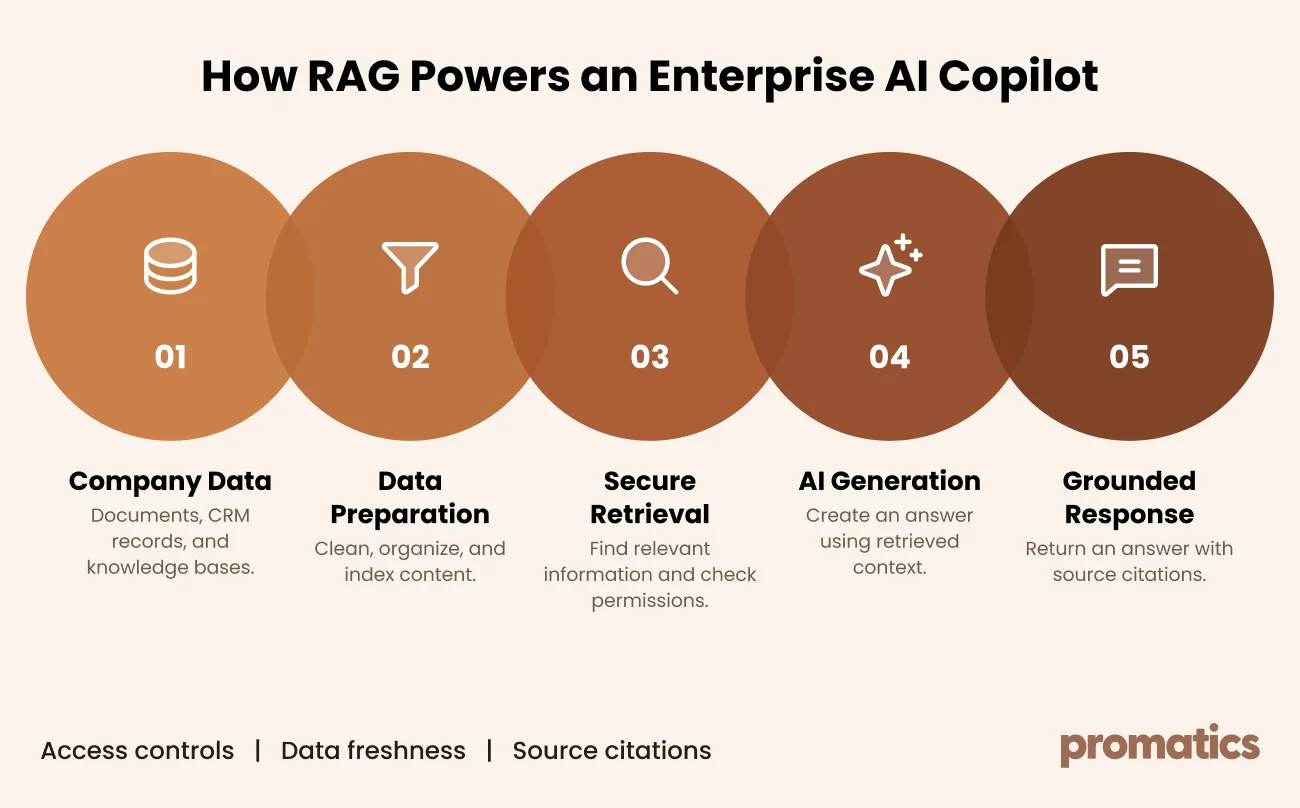
Retrieval-augmented generation (RAG) enables an AI copilot to retrieve relevant information from company data sources before generating a response. This helps the assistant use current organizational information without retraining the underlying model every time a document changes.
A typical RAG workflow includes five stages:
- Data ingestion: Collect documents, internal policies, knowledge base articles, and approved business records.
- Data preparation: Clean and divide content into meaningful sections, preserving source information.
- Secure retrieval: Search for relevant passages and enforce the user’s access permissions.
- Response generation: Provide retrieved information to the AI model to generate a grounded answer.
- Validation and refresh: Return relevant citations, handle insufficient evidence, and update the knowledge base as source information changes.
RAG can improve the relevance of enterprise AI responses, but it does not automatically guarantee accuracy. Poor source data, weak retrieval, conflicting documents, and incorrect interpretation can still lead to unreliable answers.
Two implementation requirements are especially important:
- Permission-aware retrieval: Users must not access information they are unauthorized to view in the original system.
- Data freshness: The system needs a reliable process for updating indexes when source documents change.
For additional technical reading, explore the research on retrieval-augmented generation techniques.
5. AI Copilot Tools, Actions, and Agent Workflows
An enterprise copilot becomes more useful when it can interact with approved business systems instead of only answering questions. Depending on its configuration, it may retrieve a report, draft a CRM update, prepare a support ticket, or summarize a customer record.
These capabilities should be designed with narrowly scoped tools, clear permissions, and appropriate approval steps.
Best practices for AI copilot actions
- Define specific tools with validated inputs and outputs.
- Use the appropriate user identity and permissions for system access.
- Limit the data and operations available to each tool.
- Require confirmation for consequential actions such as payments, deletions, and external communications.
- Log tool calls and outcomes for troubleshooting and auditing.
Common AI orchestration patterns
| Pattern | Example application |
| Prompt chaining | Extract invoice details, validate them, and draft a response |
| Routing | Direct support requests to the appropriate workflow |
| Parallelization | Review a document across several independent risk categories |
| Orchestrator-workers | Investigate an incident using tickets, logs, and runbooks |
| Evaluator-optimizer | Review a drafted response against business policies |
The architecture should match the complexity of the task. Not every copilot requires a fully autonomous agent or a multi-agent system.
Businesses considering standardized connections between AI applications and tools can also evaluate the Model Context Protocol (MCP). Every connection should still be reviewed for authentication, permissions, and security.
6. Integrating AI Copilots With Enterprise Systems
Enterprise AI integration allows copilots to retrieve relevant information and support tasks inside existing business applications. Without reliable integrations, a copilot may remain limited to general question answering.
Common enterprise integrations
| System | Potential copilot capabilities |
| CRM platforms | Summarize accounts and draft follow-ups |
| HR systems | Answer employee policy questions |
| IT service management | Retrieve tickets and suggest resolutions |
| Collaboration tools | Answer questions using approved team information |
| Document management | Find and cite relevant documents |
| ERP and finance systems | Retrieve records and prepare reports |
Integration approaches
- Direct APIs: Connect through supported application interfaces.
- Standard connectors: Reuse available connectors where they meet requirements.
- Middleware: Add an integration layer for systems with different data formats or interfaces.
- Robotic process automation: Consider UI-based automation when suitable APIs are unavailable, while accounting for interface changes.
- Gradual modernization: Replace fragile workarounds with supported integrations over time.
Before deployment, verify authentication, least-privilege access, error handling, logging, and realistic failure scenarios. Start with read-only access wherever practical, and add write permissions only when they are needed and properly controlled.
7. Designing an Effective Enterprise AI Copilot Interface
A copilot is more likely to become part of everyday work when employees can access it within familiar applications. The right interface depends on the workflow, the context required, and the actions the assistant can perform.
| Interface | Suitable use |
| Chat in collaboration tools | Quick questions and internal information retrieval |
| Dedicated web portal | Complex tasks and document analysis |
| Embedded business application | Contextual assistance inside CRM, HR, or support systems |
| Email or voice interface | Selected customer service and field workflows |
Essential interface principles
- Display sources alongside relevant answers.
- Make uncertainty and limitations clear.
- Offer human assistance when the copilot cannot resolve a request.
- Preview proposed changes before modifying business data.
- Request confirmation for important actions.
- Collect feedback to identify recurring usability and quality issues.
Good interface design helps employees understand what the copilot can do and when they should verify its output.
8. AI Copilot Security, Governance, and Compliance
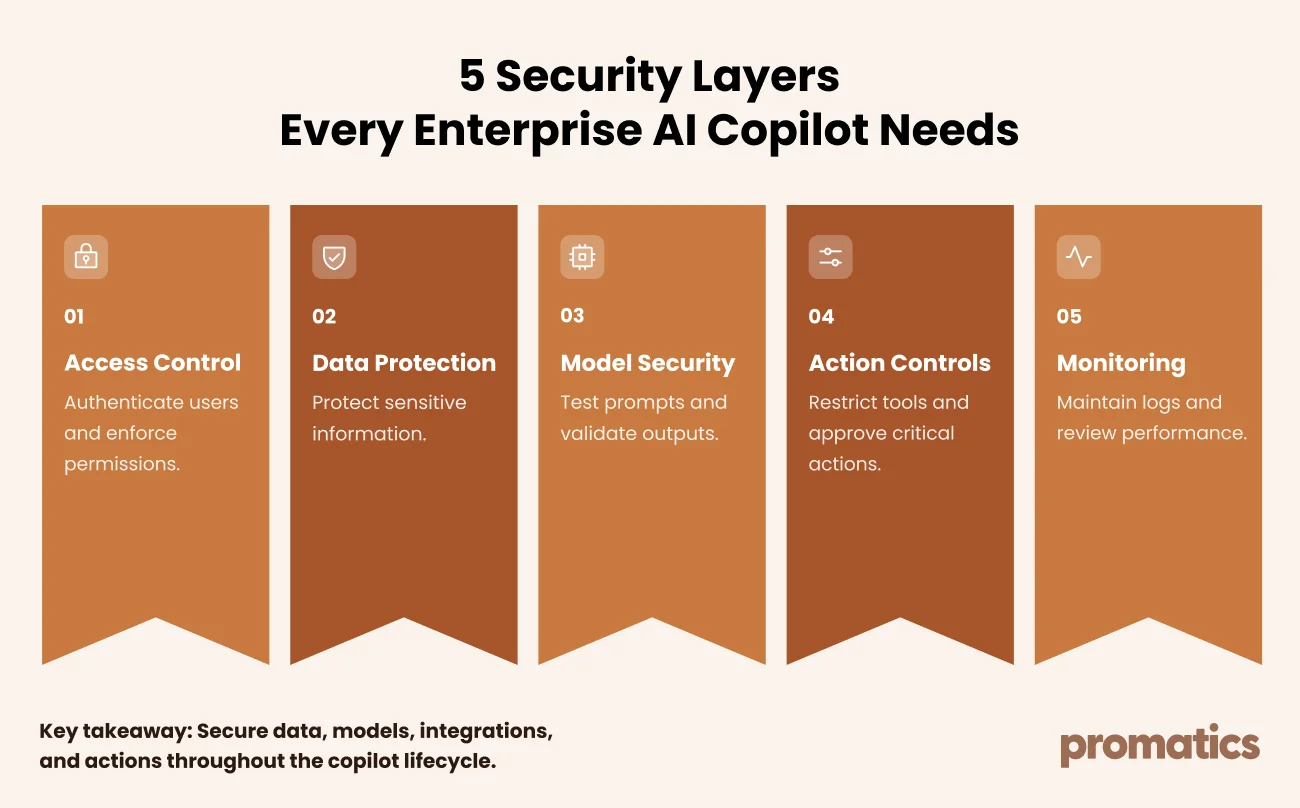
Security must be part of AI copilot development from the beginning. Enterprise assistants may interact with confidential documents, personal information, internal applications, and systems capable of making changes. These capabilities introduce risks across data retrieval, model inputs and outputs, and tool execution.
The OWASP Top 10 for Large Language Model Applications provides a useful starting point for identifying common risks.
Major security risks and controls
| Risk | Recommended control |
| Prompt injection | Treat retrieved content as untrusted and validate tool requests |
| Sensitive data exposure | Enforce access permissions and protect sensitive fields |
| Excessive autonomy | Apply least privilege and require approval for consequential actions |
| Unsafe model outputs | Validate outputs before passing them to other systems |
| Vulnerable integrations | Review third-party components and monitor access |
Governance and compliance considerations
Enterprises should establish policies for data access, retention, logging, acceptable use, incident response, and ongoing accountability.
Depending on the deployment, relevant requirements may include GDPR, HIPAA, India’s Digital Personal Data Protection Act, 2023, the EU AI Act, and applicable industry obligations. Security and AI management frameworks such as ISO/IEC 27001, ISO/IEC 42001, and the NIST AI Risk Management Framework may also help structure governance activities.
The applicability of each law or standard depends on the organization, its locations, the data being processed, and the intended use of the system. This guide is not legal advice; confirm requirements with qualified legal and compliance professionals.
9. Evaluating AI Copilot Performance
An AI copilot should be evaluated before launch and monitored throughout its lifecycle. A successful demonstration does not prove that a system will deliver reliable results in production.
What should enterprises measure?
| Evaluation area | Example metrics |
| Retrieval quality | Relevant-source retrieval rate |
| Answer quality | Accuracy and citation correctness |
| Security | Security test pass rate |
| Task completion | Completion rate and escalation frequency |
| Reliability | Latency and error rate |
| Cost | Cost per interaction or completed task |
| Adoption | Active users and repeat usage |
Building an evaluation process
- Collect representative user questions and establish reference answers with domain experts.
- Test retrieval, answer quality, and task completion against agreed criteria.
- Repeat tests whenever models, prompts, data indexes, or integrations change.
- Include security tests and scenarios where the correct response is to refuse or escalate.
- Review production failures and user feedback to identify improvements.
- Monitor performance, cost, and adoption after release.
Evaluation should reflect the risk and scope of the application. High-impact workflows need more rigorous testing and oversight than low-risk information retrieval tasks.
10. AI Copilot Development Roadmap
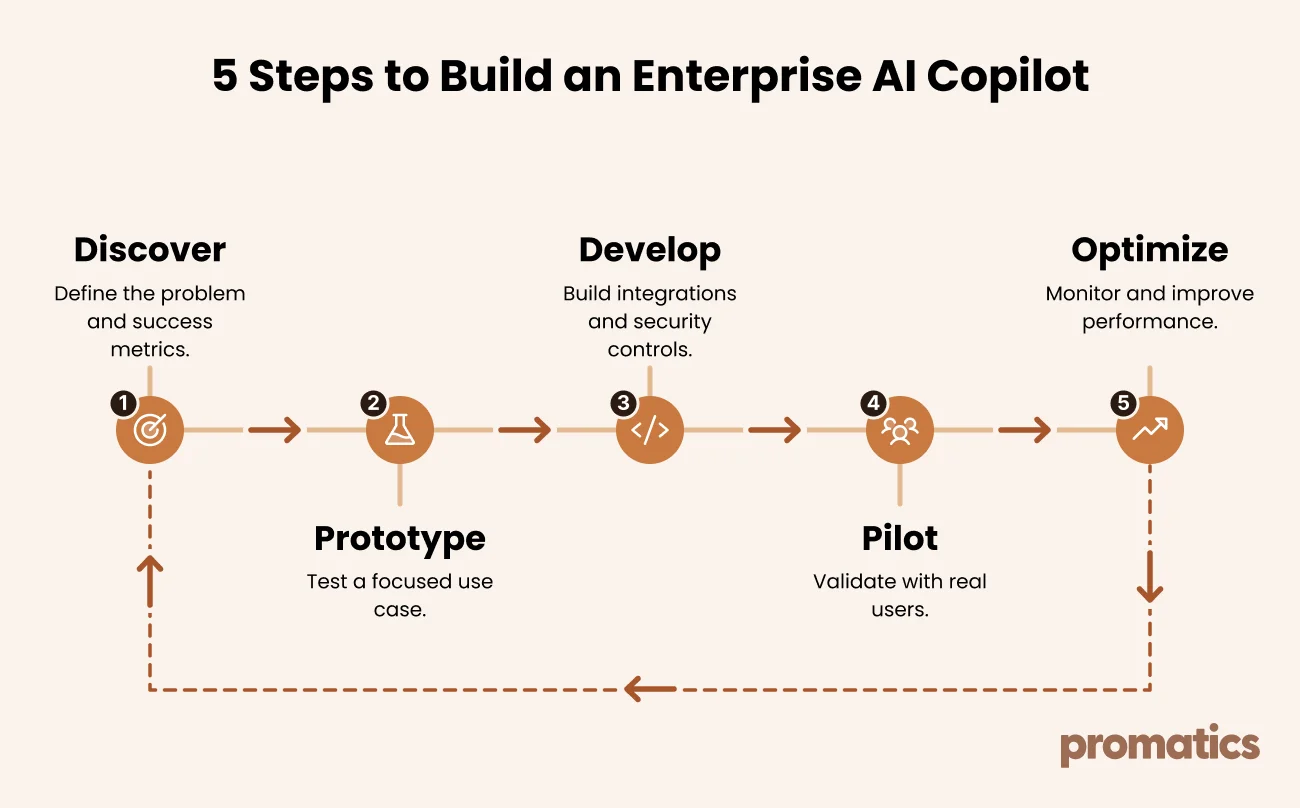
A structured roadmap helps businesses validate the use case before investing in a full production rollout. Each stage should have clear deliverables and criteria for deciding whether to proceed.
Phase 1: Discovery and planning
Identify users, business objectives, data sources, existing systems, constraints, and success metrics.
Deliverable: Defined use case, initial architecture, and risk assessment.
Phase 2: Proof of value
Build a focused prototype using representative data. Evaluate answer quality, usability, and integration feasibility.
Deliverable: Working prototype and evidence of potential business value.
Phase 3: Production development
Implement integrations, authentication, access controls, logging, evaluation, error handling, and approval workflows.
Deliverable: Tested release candidate with documented operational controls.
Phase 4: Pilot deployment
Introduce the copilot to selected users, provide training, gather feedback, and resolve issues.
Deliverable: Pilot results and a decision on wider rollout.
Phase 5: Monitoring and optimization
Monitor accuracy, security, reliability, usage, and operating costs. Improve workflows and update knowledge sources based on evidence.
Deliverable: Ongoing improvement plan with clear ownership.
Timelines vary according to data readiness, integration complexity, security requirements, and project scope. Avoid committing to full deployment until the previous stage meets its agreed criteria.
11. AI Copilot Development Costs and ROI
The cost of developing an enterprise AI copilot depends on its capabilities, usage, integrations, data infrastructure, security requirements, and ongoing maintenance.
Major cost factors
- AI model usage: Model selection, request volume, context size, and response length.
- Data infrastructure: Search systems, vector databases, ingestion pipelines, and content updates.
- Engineering: Custom workflows, integrations, testing, and evaluation.
- Security and governance: Access controls, monitoring, auditability, and compliance work.
- Maintenance: Model updates, knowledge-base changes, incident handling, and optimization.
- Adoption: Employee training and change management.
There is no universal price for enterprise AI copilot development. Businesses should request a tailored estimate based on their use case, expected usage, integration requirements, deployment model, and operating needs.
How to measure AI copilot ROI
Establish a baseline before deployment and compare it with post-launch performance. Relevant measures include:
- Time saved per task.
- Reduction in repetitive support requests.
- Task completion and error rates.
- Employee adoption and repeat usage.
- Cost per completed task.
- Improvements in service or reporting turnaround.
Calculate benefits conservatively, accounting for implementation costs, ongoing operations, human review, and maintenance. Time saved creates value when it translates into useful business capacity or measurable improvements.
12. Adoption and Change Management
Even a technically capable copilot can deliver limited value if employees do not trust it or incorporate it into their workflows. Adoption planning should happen alongside development and testing.
Best practices for adoption
- Involve representative employees early.
- Assign a business owner and leadership sponsor.
- Train users on real tasks, not just product features.
- Explain limitations and show users how to verify answers.
- Provide a clear channel for questions and feedback.
- Improve the system based on recurring issues.
- Track adoption, repeat usage, task completion, and user satisfaction.
A pilot should run long enough to reveal meaningful usage patterns. Define success criteria and rollout decisions before the pilot begins.
13. Common AI Copilot Development Mistakes
| Mistake | How to avoid it |
| Starting with an overly broad use case | Begin with one measurable workflow |
| Using poor-quality data | Clean data and assign content owners |
| Ignoring user permissions | Enforce permissions during retrieval and tool execution |
| Skipping evaluation | Create repeatable tests before release |
| Automating critical actions too early | Require human approval until controls are validated |
| Adding unnecessary complexity | Start simple and expand based on evidence |
| Neglecting employee adoption | Train users and integrate the copilot into existing workflows |
| Treating launch as the finish line | Fund ongoing monitoring and improvement |
These practices help businesses build copilots that are easier to evaluate, maintain, and scale responsibly.
14. AI Copilot Development With Promatics Technologies
Building an enterprise AI copilot requires alignment between business objectives, AI capabilities, data readiness, application architecture, and security. The implementation approach should reflect the workflow the business wants to improve rather than adding AI without a clear purpose.
Promatics Technologies provides AI and ML development services for businesses exploring AI-powered applications. Depending on project requirements, a copilot initiative may involve workflow discovery, prototype development, application engineering, enterprise integrations, testing, and ongoing optimization.
A practical engagement can begin with five activities:
- Assess the workflow: Identify users, pain points, data sources, and success metrics.
- Validate feasibility: Test a focused use case using representative data.
- Plan the architecture: Define integrations, access controls, and evaluation requirements.
- Develop and test: Build the required application components and validate performance.
- Improve after launch: Monitor quality, adoption, security, and operating costs.
The right scope depends on the business problem, existing systems, and required level of customization. Start with a clearly defined use case and expand when results support further investment.
Explore Promatics Technologies’ case studies to learn more about its project work.
Ready to Explore AI Copilot Development for Your Business?
Have a workflow that could benefit from an intelligent assistant? Discuss your requirements, existing systems, data sources, and business goals with Promatics Technologies.
- Explore services: https://www.promaticsindia.com/ai-ml-development
- Contact the team: https://www.promaticsindia.com/contact-us
- Request a project quote: https://www.promaticsindia.com/request-a-quote
