AI Copilot Development Services: How Businesses Build Intelligent AI Assistants

TL;DR
- AI copilot development builds intelligent assistants for business tasks and workflows.
- Enterprise AI copilots combine LLMs, RAG, APIs, data, and AI agents.
- AI copilot development services support sales, HR, finance, marketing, support, and more.
- Development cost depends on integrations, AI models, data, security, and complexity.
- Successful AI copilots require clear use cases, strong architecture, security, testing, and optimization.
Artificial intelligence is moving beyond chatbots and standalone AI tools.
Businesses are increasingly adopting AI copilots to help employees retrieve information, automate repetitive tasks, analyze data, generate content, support customers, and execute business workflows.
An AI copilot can work as an intelligent layer between users, enterprise data, business applications, and automated workflows. Instead of requiring employees to navigate multiple systems or follow rigid processes, it allows them to interact with software using natural language.
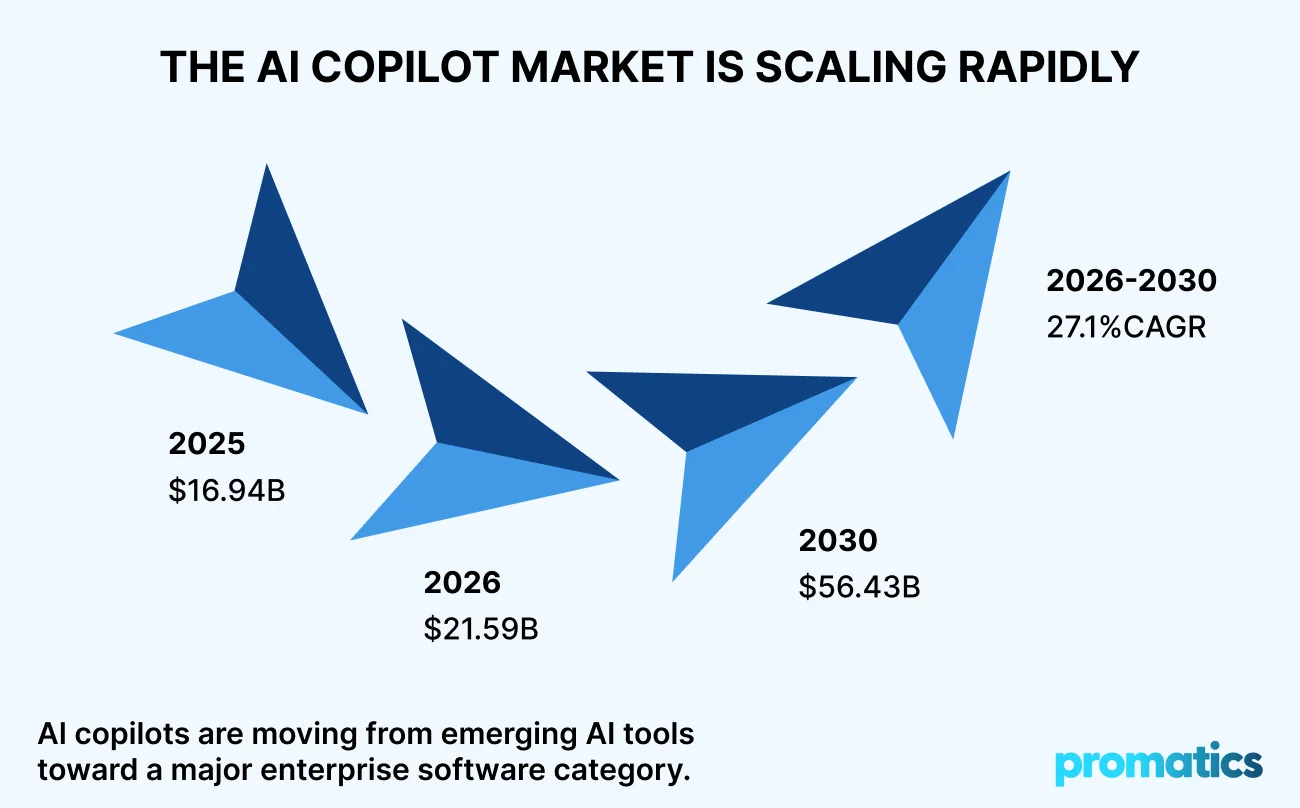
The market is expanding rapidly. According to the AI Copilot Global Market Report 2026 from Research and Markets, the global AI copilot market is projected to grow from $16.94 billion in 2025 to $21.59 billion in 2026. This growth reflects a broader shift from basic AI experimentation toward AI assistants embedded directly into enterprise applications and workflows.
For businesses, the opportunity is no longer simply to “add AI.” It is to determine where an AI copilot can create measurable business value.
This guide explains what AI copilots are, how they work, where businesses use them, what AI copilot development involves, how much development can cost, and how to choose the right AI development partner.
AI Copilot Market: Key Statistics
The rapid expansion of the AI copilot market indicates that intelligent assistants are becoming an important category of enterprise software.
| AI Copilot Market Metric | Value |
| Global market size, 2025 | $16.94 billion |
| Projected market size, 2026 | $21.59 billion |
| Growth from 2025 to 2026 | 27.4% CAGR |
| Projected market size, 2030 | $56.43 billion |
| Forecast CAGR, 2026 to 2030 | 27.1% |
Research and Markets attributes future growth to factors including the rise of agentic and autonomous AI systems, industry-specific copilots, multimodal AI, enterprise AI adoption, private-cloud and on-premises deployments, AI governance, and the integration of copilots into major SaaS ecosystems.
The report also identifies several major AI copilot categories, including coding, content creation, business processes, healthcare, and customer support, demonstrating that the technology is expanding across different business functions.
Microsoft Copilot provides one example of this wider enterprise AI movement. Statista tracks Microsoft 365 Copilot’s global monthly active users and identifies it as one of the significant early AI productivity platforms. Its published data covers monthly active users from January through November 2025, although the exact values are available only to registered users.
What Does This Mean For Businesses?
The market is moving from simple AI assistants toward systems that can:
- Understand natural-language requests
- Retrieve enterprise knowledge
- Analyze business information
- Connect with existing applications
- Execute defined workflows
- Provide contextual recommendations
- Support employees and customers
For companies considering AI adoption, this creates a strong case for developing custom AI copilots connected to proprietary data and business systems rather than deploying generic AI tools alone.
What Is An Ai Copilot?
An AI copilot is an intelligent software assistant that uses artificial intelligence to help users complete tasks, retrieve information, analyze data, generate content, make decisions, or execute workflows.
Unlike traditional software, an AI copilot can interpret natural-language instructions and use relevant context to assist users.
For example, a sales manager could ask:
“Which opportunities in the pipeline have not had a follow-up in the last 14 days?”
Instead of manually searching through a CRM, the AI copilot could retrieve the relevant information, analyze the pipeline, identify opportunities, and present the results.
Depending on its permissions and integrations, it could also create follow-up tasks or draft emails.
An AI copilot can therefore function as more than a conversational interface. It can become an intelligent interaction layer connecting people with business data and software systems.
AI Copilot vs Traditional Chatbot: What’s the Difference?
Although the terms are sometimes used interchangeably, an AI copilot and a traditional chatbot serve different purposes.
| Capability | Traditional Chatbot | AI Copilot |
| Primary purpose | Answer questions | Assist with tasks and decisions |
| Interaction | Conversational | Conversational + action-oriented |
| Context | Limited | Context-aware |
| Enterprise data | Usually limited | Can connect to private data |
| Integrations | Basic | CRM, ERP, APIs, SaaS |
| Workflow automation | Limited | Advanced |
| Personalization | Basic | Role and context-based |
| Decision support | Limited | Data-driven recommendations |
| Actions | Mostly responses | Can execute defined actions |
A chatbot may answer:
“What is your return policy?”
An AI copilot could answer:
“Find this customer’s order, check whether it qualifies for a return, and prepare the appropriate response.”
That difference makes copilots particularly valuable for enterprise software and workflow automation.

Why Are Businesses Investing in AI Copilot Development?
The business case for AI copilots goes beyond having a more advanced chatbot.
Companies are exploring copilots to improve productivity, simplify access to information, automate workflows, and create more personalized digital experiences.
1. Improve Employee Productivity
Employees often spend significant time on repetitive knowledge-based activities such as:
- Searching for information
- Preparing reports
- Summarizing documents
- Writing emails
- Reviewing data
- Creating meeting notes
- Updating business systems
An AI copilot can assist with these tasks directly within the employee’s workflow.
For example, a sales copilot could summarize a customer’s history, identify open opportunities, prepare a meeting brief, and draft a follow-up email.
2. Make Enterprise Knowledge Easier to Access
Business knowledge is often distributed across:
- PDFs
- Databases
- CRM platforms
- Internal documentation
- Knowledge bases
- Cloud storage
- Emails
- SaaS applications
Finding the right information can become time-consuming.
An AI copilot can provide a natural-language interface over these information sources.
Instead of asking employees to search multiple systems, businesses can allow users to ask:
“What were the main customer complaints about our product last quarter?”
The copilot can retrieve relevant information and summarize it.
This is where technologies such as Retrieval-Augmented Generation (RAG) become particularly useful.
Businesses exploring broader AI adoption can also review Promatics’ AI software development guide, which covers generative AI, RAG, AI agents, intelligent automation, and other enterprise AI applications.
3. Automate Business Workflows
Advanced AI copilots can move beyond generating text.
When connected to APIs and business systems, they can initiate defined workflows.
For example:
Customer request → Intent detection → Customer data retrieval → Business-rule validation → Response generation → CRM update
This makes AI copilots particularly useful for workflow-heavy functions such as customer service, sales, HR, operations, and finance.
For more autonomous workflows, businesses can also explore AI agent development for enterprise automation.
4. Improve Customer Experience
Customer-facing AI copilots can support:
- Product discovery
- Account assistance
- Customer support
- Troubleshooting
- Product recommendations
- Onboarding
- Self-service
Instead of forcing customers through rigid menus, an AI assistant can understand natural-language questions and guide users toward relevant solutions.
5. Support Faster Decision-Making
AI copilots can bring together information from different systems and summarize it for decision-makers.
For example:
“Compare this month’s revenue with last month and identify the three biggest changes.”
The copilot can retrieve data, analyze trends, and present the findings in a conversational format.
Human decision-makers remain responsible for high-impact decisions, while AI reduces the time required to gather and interpret information.
Build Your Ai Copilot
Have a business workflow that could benefit from AI?
Promatics Technologies helps businesses design and develop AI-powered applications, intelligent assistants, RAG systems, AI agents, and automation solutions.
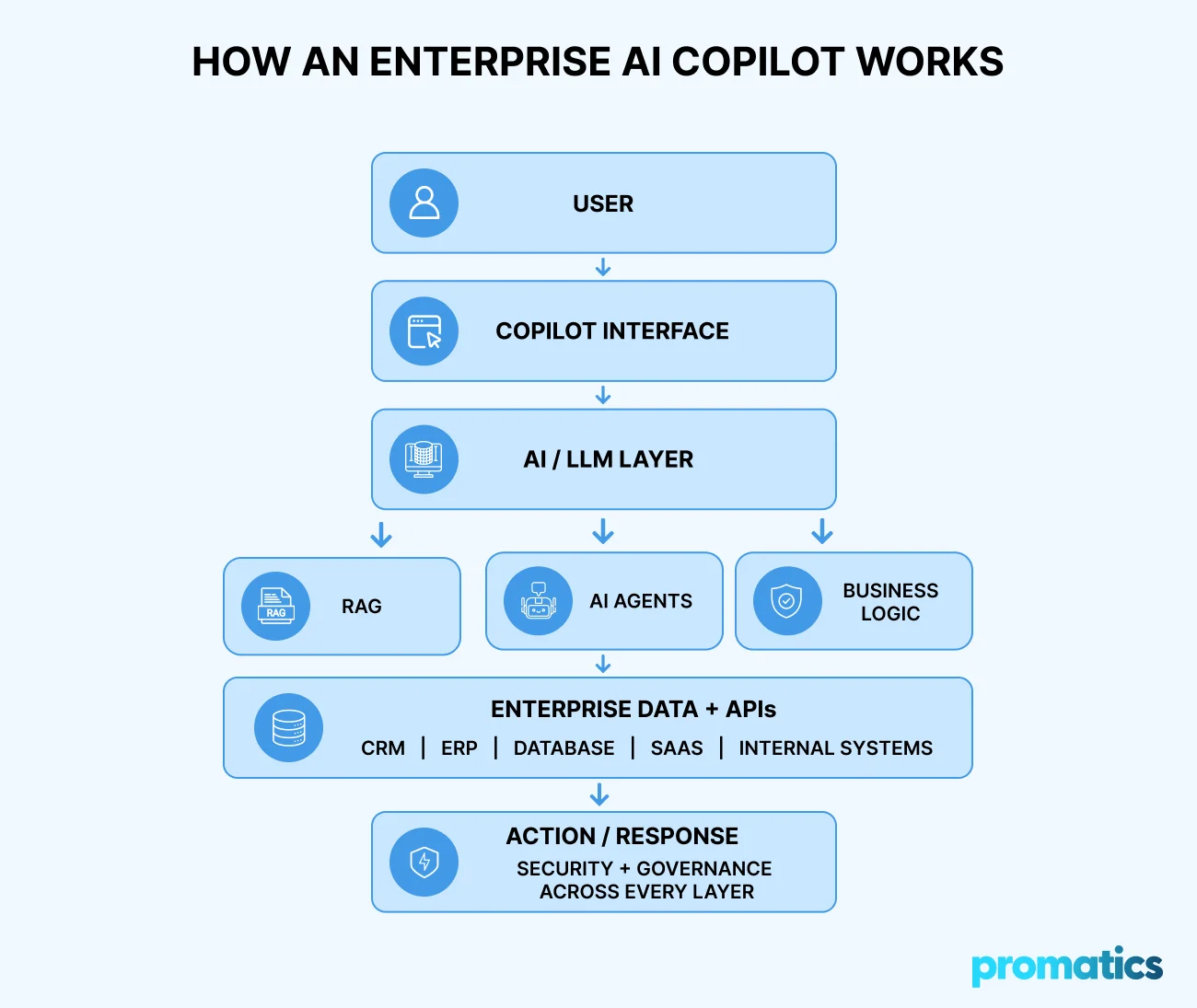
How Does An Enterprise Ai Copilot Work?
A production-ready AI copilot typically consists of multiple technology layers rather than a single AI model.
1. User Interface
Users need a simple way to interact with the copilot.
Possible interfaces include:
- Web applications
- Mobile applications
- Enterprise dashboards
- Embedded software interfaces
- Microsoft Teams
- Slack
- Voice interfaces
The interface should match the environment where users already work.
2. AI Model Layer
The AI model interprets user instructions and generates responses.
Depending on the use case, organizations can integrate large language models through APIs or use models deployed within controlled infrastructure.
Model selection should consider:
- Accuracy
- Context window
- Latency
- Cost
- Security
- Data requirements
- Reasoning capabilities
- Deployment requirements
The most expensive or largest model is not automatically the best choice.
3. Knowledge and RAG Layer
AI copilots often need access to information that is not part of the model’s original training data.
RAG allows the system to retrieve relevant information from approved sources and provide it to the AI model as context.
A typical RAG workflow looks like:
Business documents → Processing → Embeddings → Vector database → Retrieval → LLM → Response
RAG can be useful for:
- Internal knowledge assistants
- Product documentation
- Customer support
- Compliance information
- Policies
- Enterprise search
- Private company knowledge
4. Integration Layer
The integration layer connects the AI copilot with existing business systems.
These may include:
- CRM
- ERP
- HRMS
- Databases
- Payment systems
- Marketing platforms
- SaaS applications
- Internal APIs
- Cloud services
This layer is essential when the copilot needs to retrieve real-time information or perform actions.
5. AI Agent and Workflow Layer
More advanced copilots can use AI agents to complete multi-step tasks.
For example:
User request
↓
Understand objective
↓
Plan required steps
↓
Retrieve information
↓
Use business tools
↓
Execute workflow
↓
Verify result
↓
Return response
This is where the line between an AI copilot and an AI agent can begin to blur.
6. Security and Governance Layer
Enterprise AI systems may interact with sensitive business information, making security a core architectural requirement.
Important controls include:
- Authentication
- Authorization
- Role-based access
- Data encryption
- Data isolation
- Audit logging
- API security
- Prompt security
- Human approval
- Monitoring
- Governance
Security should be designed into the system from the beginning rather than added after deployment.
Key Features of AI Copilot Development Services
When evaluating AI copilot development services, businesses should look beyond the AI model itself.
Natural-Language Interaction
Users should be able to communicate naturally rather than learn complicated commands.
Context Awareness
The copilot should understand relevant conversation history, user roles, business context, and task requirements.
Enterprise Knowledge Retrieval
The system should retrieve relevant information from authorized business sources.
Personalization
Different employees may require different information based on their roles and permissions.
For example, a sales executive may access customer and pipeline information, while a finance manager may access financial reporting data.
Multi-System Integration
The copilot should connect with the systems required to complete the user’s task.
Workflow Automation
The AI assistant can trigger predefined workflows through APIs and business rules.
Human-in-the-Loop Controls
Sensitive or high-impact actions can require human approval.
Analytics and Monitoring
Businesses can track:
- Copilot usage
- Response quality
- Task completion
- User satisfaction
- Errors
- Latency
- AI costs
- Hallucination rates
Enterprise AI Copilot Use Cases
AI copilots can support almost any function involving knowledge, communication, analysis, or repetitive workflows.
Sales Copilot
A sales AI assistant can:
- Research prospects
- Summarize customer interactions
- Analyze opportunities
- Generate proposals
- Draft follow-up emails
- Update CRM records
- Recommend next actions
Customer Support Copilot
A support copilot can:
- Classify customer requests
- Search knowledge bases
- Summarize customer history
- Recommend responses
- Retrieve account information
- Escalate complex cases
HR Copilot
HR teams can use AI assistants for:
- Employee onboarding
- Policy questions
- Benefits information
- Internal knowledge retrieval
- Document generation
- HR workflow assistance
Finance Copilot
Finance teams can use copilots for:
- Report generation
- Data analysis
- Expense analysis
- Forecasting assistance
- Financial document processing
- Natural-language data queries
Marketing Copilot
Marketing teams can use AI assistants for:
- Campaign planning
- Content ideation
- Audience research
- SEO analysis
- Performance reporting
- Competitor research
Developer Copilot
Development teams can use AI copilots to:
- Generate code
- Review code
- Debug applications
- Create documentation
- Generate test cases
- Explain legacy code
How to Develop an AI Copilot
Building a useful AI copilot starts with the business problem rather than the technology.
Step 1: Identify the Business Problem
Determine where AI can create measurable value.
Ask:
- Which tasks consume the most employee time?
- Which workflows are repetitive?
- Where is information difficult to access?
- Which decisions require extensive data gathering?
- Where do users repeatedly interact with multiple systems?
The goal should be to identify a specific business outcome.
Step 2: Define the Copilot’s Scope
Clearly establish:
- Target users
- Supported tasks
- Data sources
- Required integrations
- User permissions
- Actions the AI can perform
- Actions requiring human approval
This prevents unnecessary complexity.
Step 3: Design the AI Architecture
The development team determines the appropriate:
- LLM strategy
- RAG architecture
- Vector database
- Data pipeline
- Agent framework
- API architecture
- Authentication
- Monitoring infrastructure
The architecture should be designed around the use case, not around a single AI model.
Step 4: Prepare Business Data
AI copilots are only as useful as the information they can access.
Data preparation may involve:
- Document processing
- Data cleaning
- Chunking
- Embedding generation
- Metadata creation
- Vector indexing
- Database integration
- Permission mapping
Step 5: Develop the Copilot
The development team builds:
- User interface
- Backend services
- AI orchestration
- Prompts
- Retrieval systems
- Tools
- APIs
- Workflow logic
- Business rules
Step 6: Integrate Business Systems
The copilot can be connected to the required systems through APIs and secure integrations.
For example:
Copilot → CRM → Customer information
or
Copilot → ERP → Inventory data
or
Copilot → Knowledge base → Company policies
Step 7: Implement Security
Security controls should include:
- Authentication
- Authorization
- Role-based access
- Encryption
- Secure APIs
- Audit logs
- Data governance
For regulated industries, additional compliance requirements may apply.
Step 8: Test and Evaluate
AI testing requires more than conventional functional testing.
Teams should evaluate:
- Accuracy
- Relevance
- Hallucinations
- Response consistency
- Security
- Latency
- Cost
- Task completion
- User experience
Step 9: Deploy and Optimize
Deployment is not the end of AI copilot development.
Organizations should continuously monitor:
Performance → Usage → Feedback → Errors → Costs → Model behavior → Improvements
This creates a continuous AI optimization cycle.
How Much Does AI Copilot Development Cost?
The cost of AI copilot development depends on the complexity of the solution, number of integrations, data requirements, security requirements, AI model selection, and deployment environment.
A basic internal knowledge assistant will generally require less development effort than an enterprise copilot capable of accessing multiple systems and executing complex workflows.
Key factors that influence AI copilot development cost
- Number of users
- Number of integrations
- AI model selection
- RAG requirements
- Data preparation
- AI agent capabilities
- UI/UX complexity
- Backend infrastructure
- Cloud infrastructure
- Security requirements
- Compliance requirements
- Testing and evaluation
- Ongoing AI optimization
AI Copilot Complexity Levels
| Solution | Complexity | Typical Requirements |
| Basic AI assistant | Low | LLM + simple interface |
| Knowledge copilot | Medium | LLM + RAG + knowledge base |
| Customer support copilot | Medium | RAG + CRM + support workflows |
| Enterprise workflow copilot | High | APIs + RAG + workflows + security |
| Multi-agent copilot | Very High | Multiple agents + orchestration + integrations |
Instead of using a generic development-cost figure, businesses should first define the scope and technical requirements.
A reliable estimate can then be created based on the number of users, workflows, data sources, integrations, and AI capabilities required.
How to Choose an AI Copilot Development Company
Selecting an AI copilot development company requires evaluating both AI expertise and conventional software engineering capabilities.
Look for a development partner that understands:
Large Language Models
The team should understand model selection, prompting, context management, evaluation, and AI integration.
RAG and Enterprise Knowledge
If the copilot needs to work with private company information, the development team should understand RAG, vector search, data pipelines, and retrieval evaluation.
AI Agents
For complex workflows, the partner should understand AI agent architecture, tool use, orchestration, and human approval mechanisms.
Promatics’ AI agent development services guide explains how AI agents can be used for workflow automation and intelligent business applications.
Enterprise Integrations
The AI assistant should integrate with existing CRM, ERP, databases, APIs, and SaaS platforms.
Security
The development partner should understand authentication, authorization, data privacy, secure APIs, monitoring, and governance.
Full-Stack Development
AI is only one part of the solution.
A production-ready copilot also requires:
Frontend + Backend + APIs + Databases + Cloud + Security + AI
This is why businesses often benefit from working with a development company that combines AI expertise with full-stack software engineering.
Why Choose Promatics Technologies for AI Copilot Development?
Promatics Technologies combines AI development with full-stack software engineering to help businesses build production-ready digital solutions.
Promatics’ current AI software development portfolio covers machine learning, generative AI, NLP, computer vision, speech AI, intelligent automation, RAG, and AI agents. The company states that it has delivered 30+ AI projects across these capabilities.
Its AI development approach covers the broader lifecycle from strategy and proof of concept through development, API integration, cloud deployment, security, testing, and post-launch optimization.
Promatics AI Copilot Development Capabilities
- Custom AI copilot development
- Generative AI development
- AI agent development
- RAG implementation
- LLM integration
- Enterprise AI solutions
- AI-powered workflow automation
- API and third-party integrations
- Web application development
- Mobile application development
- Cloud application development
- AI optimization and maintenance
The goal is not simply to create another chatbot.
The objective is to develop an AI assistant that understands the business context, connects with the required systems, supports users, and delivers measurable operational value.
Businesses can also explore Promatics’ broader artificial intelligence development services for enterprise AI strategy, implementation, and intelligent automation.
CTA: BUILD YOUR AI COPILOT WITH PROMATICS
Have an AI copilot idea?
Whether you need an internal knowledge assistant, customer support copilot, sales assistant, developer copilot, or enterprise workflow solution, Promatics Technologies can help you turn the concept into a production-ready application.
The Future of AI Copilots
The evolution of AI copilots is moving beyond simple question-and-answer interfaces.
Research and Markets identifies several trends shaping the market, including multi-agent workflows, copilots embedded directly into core applications, multimodal interaction, usage-based pricing, stronger trust and governance capabilities, and greater emphasis on measurable business outcomes.
This suggests that future AI copilots will increasingly behave like intelligent workflow partners.
Instead of:
User → Prompt → Answer
the interaction could become:
User → Goal → AI reasoning → Data retrieval → Tool use → Workflow execution → Verification → Result
This evolution will make AI copilots increasingly relevant to enterprise software, SaaS platforms, customer experience systems, and internal business applications.
Turn AI Into a Business Advantage
The real value of an AI copilot isn’t in answering questions. It’s in helping your business work smarter, faster, and better.
The right copilot connects business data, intelligent workflows, secure integrations, and AI to solve real operational challenges, from customer support and sales to enterprise search and employee productivity.
The question isn’t simply, “Can we use AI?”
It’s “Where can AI create the biggest impact for our business?”
That’s where the right strategy and technology partner make the difference.
Ready to Build Your AI Copilot?
Don’t just add AI. Build an intelligent system that delivers business results.
Talk to Promatics Technologies About Your AI Copilot Project →
