Intelligent Document Processing: How AI Automates Enterprise Document Workflows

TL;DR
- Intelligent Document Processing (IDP) uses AI, OCR, and machine learning to automatically classify documents, extract data, and validate information with minimal manual effort. From invoice processing to contract management, IDP helps enterprises reduce manual effort, improve accuracy, and streamline workflows through secure, scalable automation.
- Enterprises handle invoices, contracts, purchase orders, insurance claims, customer forms, employee records, and financial statements every day. Although these documents contain valuable business information, extracting and processing it manually can slow operations, increase costs, and introduce errors. Traditional document management systems help organizations store, organize, and retrieve files. However, storing a document is different from understanding its contents and using that information to trigger a business process. Intelligent Document Processing (IDP) offers a smarter way to automate document-heavy workflows. It combines AI, OCR, machine learning (ML), natural language processing (NLP), and workflow automation to classify documents, extract and validate data, and deliver structured information to connected business systems.
- For businesses exploring AI-powered business automation, IDP provides a practical way to reduce repetitive work, improve data accessibility, and connect document handling with everyday business operations.
Enterprises handle invoices, contracts, purchase orders, insurance claims, customer forms, employee records, and financial statements every day. Although these documents contain valuable business information, extracting and processing it manually can slow operations, increase costs, and introduce errors.
Traditional document management systems help organizations store, organize, and retrieve files. However, storing a document is different from understanding its contents and using that information to trigger a business process.
Intelligent Document Processing (IDP) offers a smarter way to automate document-heavy workflows. It combines AI, OCR, machine learning (ML), natural language processing (NLP), and workflow automation to classify documents, extract and validate data, and deliver structured information to connected business systems.
For businesses exploring AI-powered business automation, IDP provides a practical way to reduce repetitive work, improve data accessibility, and connect document handling with everyday business operations.
What Is Intelligent Document Processing?
Intelligent Document Processing (IDP) is an AI-driven solution that automatically extracts, organizes, validates, and processes data from digital and scanned documents.
Unlike basic OCR tools, which primarily convert images of text into machine-readable content, IDP adds contextual understanding, data validation, and workflow integration.
For example, an IDP solution can process a supplier invoice, identify the supplier name and invoice number, extract line items and tax amounts, check the total against business rules, and transfer the verified data to accounting or ERP systems.
IDP can handle three main types of documents:
- Structured documents: Standardized forms with predefined fields.
- Semi-structured documents: Invoices, purchase orders, and statements with varying layouts.
- Unstructured documents: Contracts, reports, emails, and correspondence without a consistent format.
The goal goes beyond digitizing documents. It turns unstructured information into actionable data for business applications.
How Does Intelligent Document Processing Work?
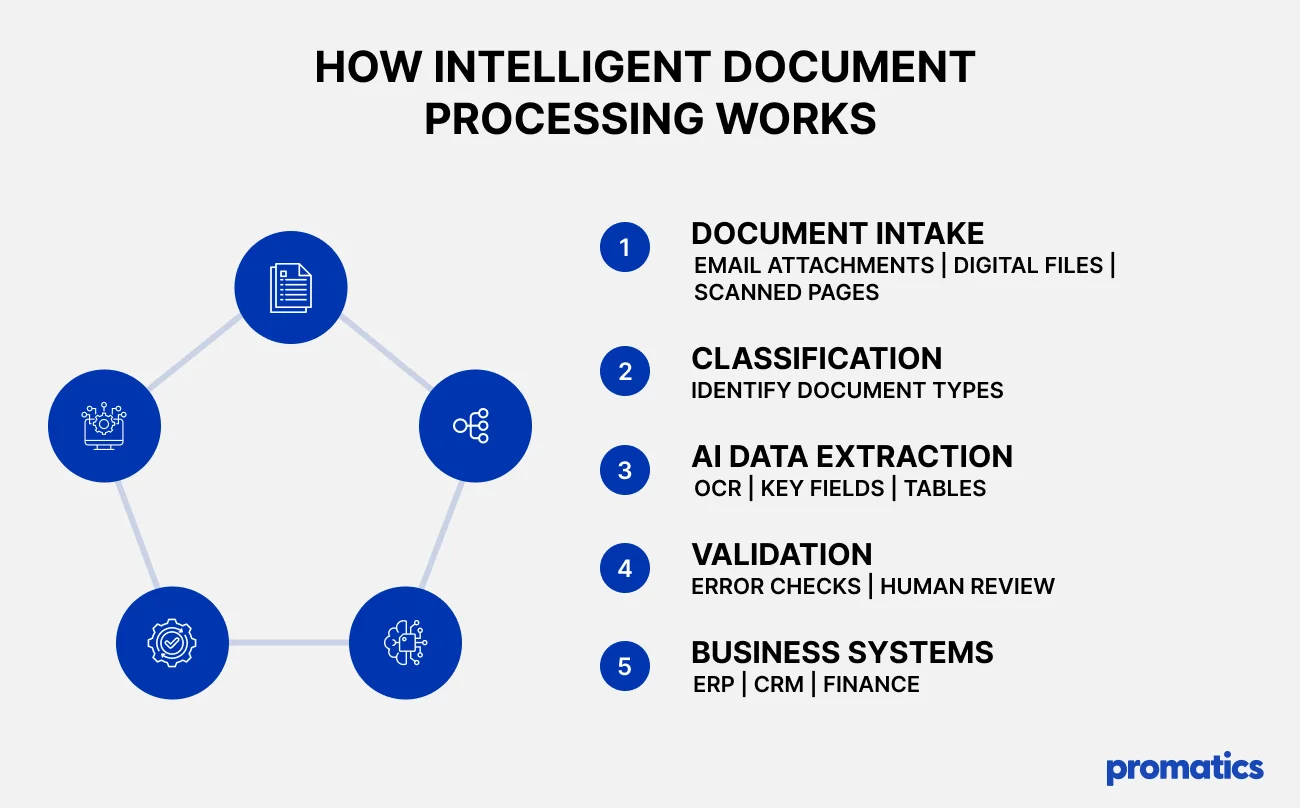
IDP workflows typically involve five key stages.
1. Document Ingestion
Documents enter the system through email attachments, file uploads, scanners, cloud storage, APIs, or enterprise applications.
The IDP solution collects the files and prepares them for processing. It can also detect duplicate files, assess image quality, and enforce basic access controls.
2. Document Classification
AI models analyze document content to classify files, such as invoices, purchase orders, and customer applications. This automates sorting and routes documents to the right workflow.
3. Data Extraction and Understanding
OCR converts text from scanned documents and images into machine-readable content, while AI models identify key fields, tables, and contextual information.
For example, invoice processing can extract:
- Supplier name and ID
- Invoice number and date
- Purchase order details
- Line items and quantities
- Tax and total amount
- Payment due date
AI can handle different document layouts, but extraction accuracy depends on document quality, model performance, and content complexity.
4. Validation and Exception Handling
The extracted information is checked against predefined business rules, reference databases, and existing enterprise records.
For example, an invoice can be compared with its purchase order and goods receipt. Missing fields, inconsistent totals, duplicate invoices, and low-confidence predictions can be flagged for review.
Human review is essential for sensitive documents and decisions involving financial, legal, or compliance risks.
5. Enterprise Integration and Workflow Automation
Once information passes the required checks, it can be transferred to connected business systems through APIs, workflow engines, or robotic process automation (RPA).
The system may update an ERP record, initiate an approval request, create a CRM entry, or notify the responsible team.
This final stage turns document extraction into an end-to-end automated workflow.
Key Technologies Behind Intelligent Document Processing
IDP integrates multiple technologies to extract data and streamline business workflows.
| Technology | Role in document processing |
| Optical Character Recognition (OCR) | Converts scanned or printed text into digital, readable data. |
| Machine Learning (ML) | Identifies patterns, classifies documents, and supports information extraction. |
| Natural Language Processing (NLP) | Helps interpret language, entities, relationships, and document meaning. |
| Large Language Models (LLMs) | Support contextual extraction, summarization, and understanding of complex documents. |
| Robotic Process Automation (RPA) | Automates repetitive actions across applications and business systems. |
| APIs and Workflow Engines | Links document processing systems with enterprise apps and approval workflows. |
These technologies work together to move organizations beyond document digitization toward intelligent, connected business processes.
Businesses planning broader AI software development initiatives can incorporate IDP into a larger enterprise automation architecture.
Benefits of Intelligent Document Processing for Enterprises
1. Reduced Manual Processing
Employees often spend hours opening files, copying information, checking records, and entering data into different applications.
IDP automates much of this repetitive work, allowing teams to focus on exceptions, analysis, and higher-value responsibilities.
2. Improved Data Accuracy
Manual data entry can introduce transcription mistakes, inconsistent formats, missing information, and duplicate records.
Automated extraction combined with validation rules helps identify discrepancies before data reaches downstream systems. Businesses should measure accuracy using representative documents rather than assuming that automation eliminates errors.
3. Faster Business Workflows
Documents can be classified, processed, and routed without waiting for every task to be completed manually.
This can shorten invoice approval cycles, accelerate customer onboarding, and improve turnaround times for claims and other document-heavy processes.
4. Lower Operational Costs
Automating repetitive document handling can reduce the effort required for data entry, filing, error correction, and manual verification.
Actual savings depend on document volume, processing complexity, exception rates, integration costs, and the amount of human review required.
5. Better Compliance and Traceability
IDP solutions can maintain processing records, validation outcomes, timestamps, and approval histories.
When configured appropriately, these capabilities help organizations investigate discrepancies, support audits, and track how information moves through a workflow.
6. Greater Scalability
Manual processes become harder to manage as document volumes grow across departments and locations.
A properly designed IDP pipeline can scale processing capacity while maintaining consistent workflows. Organizations must still plan for peak demand, infrastructure costs, security, and human review.
Intelligent Document Processing Use Cases Across Industries
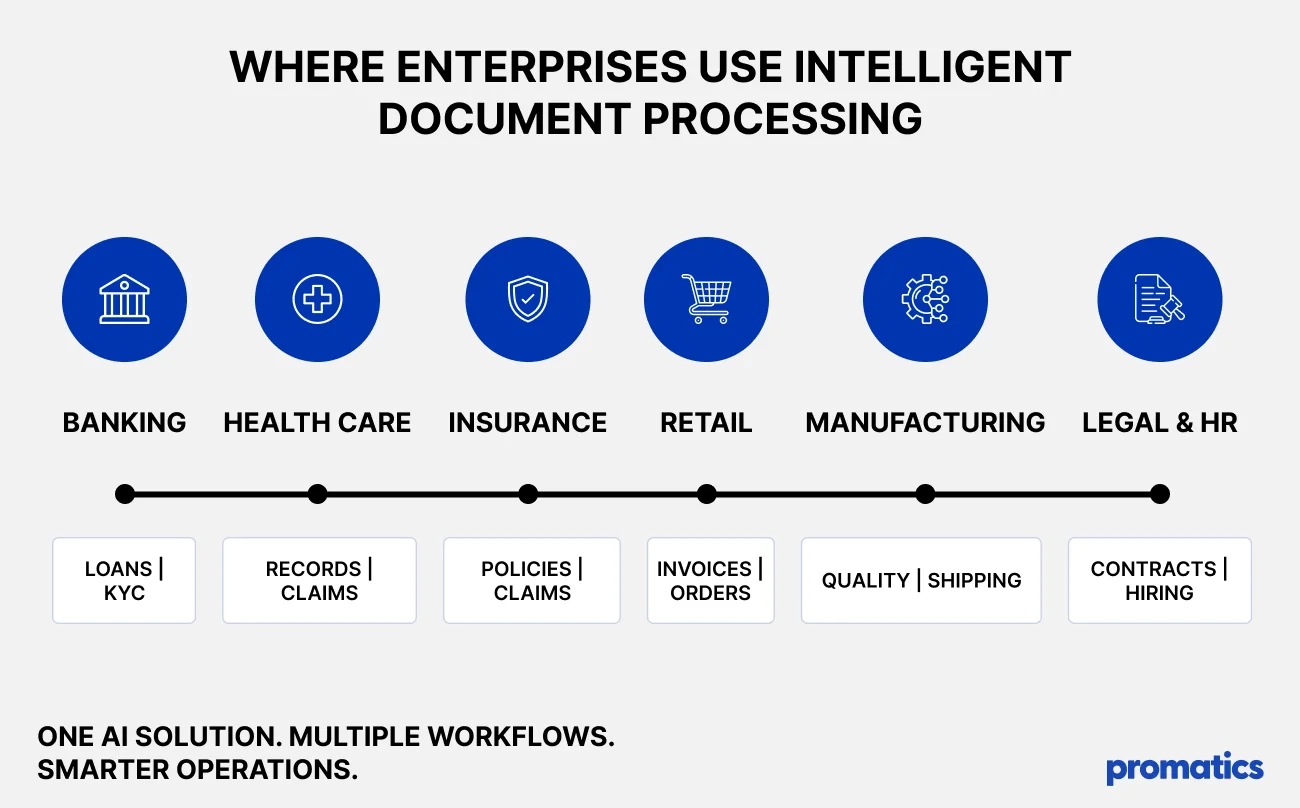
IDP can support enterprise operations wherever important information is contained in documents.
| Industry | Documents processed | Potential applications |
| Banking and financial services | Loan applications, bank statements, identity documents | Customer onboarding, financial data extraction, document verification |
| Healthcare | Patient forms, medical records, insurance documents | Registration, claims processing, administrative workflows |
| Insurance | Claim forms, policy documents, repair estimates | Claims classification, information extraction, case routing |
| Retail and eCommerce | Purchase orders, invoices, supplier documents | Accounts payable, inventory coordination, supplier onboarding |
| Manufacturing | Quality reports, purchase orders, shipping documents | Procurement automation, compliance checks, supply chain workflows |
| Legal services | Contracts, agreements, regulatory filings | Clause extraction, document classification, obligation tracking |
| Human resources | Resumes, employee forms, identification records | Candidate data extraction, employee onboarding, record management |
Intelligent Document Processing vs. Traditional OCR
OCR and intelligent document processing are related, but they serve different purposes.
OCR extracts text from images and scanned documents into machine-readable data. It does not, by itself, reliably determine the business meaning of every extracted field or execute a complete workflow.
IDP builds on OCR by adding document classification, AI-based extraction, contextual interpretation, validation, and integration with enterprise applications.
Consider a scanned invoice. An OCR tool may recognize the text containing the invoice number and total amount. An IDP workflow can identify those values as specific fields, compare them with purchase records, flag discrepancies, and route the invoice for approval.
| Capability | Traditional OCR | Intelligent Document Processing |
| Text recognition | Core capability | Usually included |
| Document classification | Limited or separately configured | AI-assisted classification |
| Contextual data extraction | Requires additional processing | Supported by AI extraction |
| Business rule validation | Requires additional logic | Can be integrated into the workflow |
| Enterprise integration | Requires additional configuration | Can connect extraction to business applications |
| Exception handling | Usually separately implemented | Can include confidence checks and human review |
The best option depends on document complexity and business needs. For simple text recognition, OCR may be sufficient. For varied documents and end-to-end automation, IDP can provide broader capabilities.
A Practical Example: Automating Invoice Processing
Consider a company receiving hundreds of supplier invoices each week. Its finance team manually opens each invoice, enters information into accounting software, checks purchase orders, and requests approval.
This process can create delays, duplicate entries, and additional work when information is missing or inconsistent.
An IDP-enabled workflow could operate differently:
Before automation
<escape>Receive Invoice → Open PDF → Enter Data Manually → Check Records → Request Approval → Update Accounting System</escape>
After introducing IDP
<escape>Receive Invoice → AI Extracts Data → Validate Against Records → Route Exceptions → Approve → Update Accounting System</escape>
Invoices that pass the configured validation rules can move through the workflow with less manual handling. Invoices with mismatched totals, missing purchase orders, or uncertain extracted values can be routed to employees for review.
The business can evaluate the impact by measuring processing time per invoice, cost per document, exception rate, duplicate detection, and manual intervention before and after implementation.
This is an illustrative workflow, not a claim of guaranteed savings. Actual results depend on document quality, process design, integrations, and validation requirements.
Challenges to Consider When Implementing IDP
Although IDP can deliver operational improvements, successful implementation requires more than deploying an AI model.
- Poor document quality: Blurred scans, handwriting, unusual layouts, and damaged pages can reduce extraction accuracy. Preprocessing and exception handling can help address these issues.
- Data privacy and security: Documents may contain personal data, financial information, contracts, or confidential business records. Organizations should implement encryption, role-based access controls, retention policies, and appropriate compliance safeguards.
- Integration complexity: Existing ERP, CRM, accounting, and document management systems may use different data formats and interfaces. Reliable API integration and workflow orchestration are essential.
- Accuracy and validation: AI may produce incomplete or inaccurate results. Set clear accuracy thresholds, validation rules, testing protocols, and human review procedures.
- Change management: Employees need clear workflows, training, and escalation procedures to work effectively with automated systems.
- Cost and return on investment: Licensing, infrastructure, integration, maintenance, and exception handling all influence the business case. Organizations should evaluate total cost of ownership against measurable operational improvements.
How to Implement Intelligent Document Processing Successfully
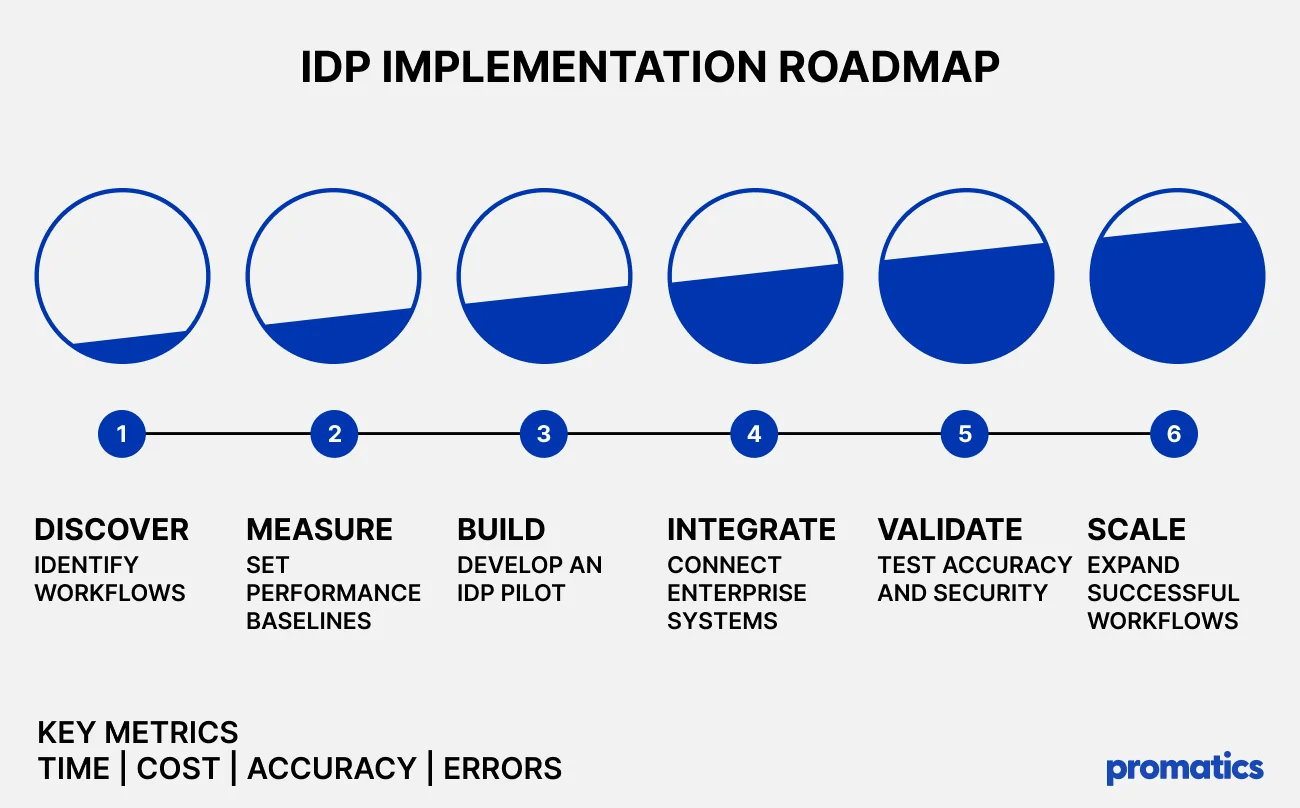
A phased approach helps enterprises reduce implementation risk and establish a clear path to scaling.
Step 1: Identify High-Impact Workflows
Start with a process involving high document volumes, repetitive data entry, frequent errors, or long processing times. Accounts payable, customer onboarding, and claims administration are common candidates.
Step 2: Define Success Metrics
Establish baseline performance before implementation. Relevant metrics include average processing time, cost per document, extraction accuracy, exception rate, and the percentage of documents processed without manual intervention.
Step 3: Choose the Right Technology
Evaluate OCR capabilities, AI extraction quality, supported document formats, integration options, scalability, deployment requirements, and security controls.
The right solution should fit the business workflow rather than forcing the organization to redesign every process around a particular tool.
Step 4: Build and Test a Pilot
Use representative documents, including difficult layouts and edge cases. Compare extracted values against verified records and test how the system handles missing information, duplicate documents, and inconsistent data.
Step 5: Integrate With Enterprise Systems
Connect the IDP workflow to the applications where extracted information must be used. Define data mappings, approval rules, error handling, and audit requirements.
Step 6: Monitor and Optimize
Track performance after deployment. Review extraction errors, exception queues, processing costs, and user feedback. Update models, business rules, and workflow logic as document patterns change.
Once the pilot demonstrates reliable performance, expand the solution to additional document types and departments.
The Future of Intelligent Document Processing
The evolution of IDP is moving beyond information extraction toward making document content usable across enterprise AI systems.
Generative AI can help interpret complex language, summarize lengthy reports, and extract context-dependent information. Retrieval-augmented generation (RAG) can make processed documents searchable and provide relevant context to AI applications.
AI agents can also use structured document data to support multistep workflows, such as identifying missing information, preparing recommendations, and initiating permitted actions.
Organizations exploring AI agent development for enterprise automation can consider how document intelligence fits into broader workflows involving enterprise data and business applications.
However, greater automation also increases the importance of data governance, access controls, evaluation, and human oversight. AI-generated information should be checked against source documents, and consequential actions should follow defined permissions and approval rules.
The most effective approach combines document intelligence with reliable data pipelines, enterprise integration, and measurable business controls.
Should You Build a Custom IDP Solution or Use Existing Software?
Not every organization needs to build an intelligent document processing platform from scratch.
Existing IDP Software May Be Suitable When:
- Document types and workflows are relatively standard.
- An available platform supports the required integrations.
- The business needs to deploy quickly.
- Built-in capabilities satisfy security and compliance requirements.
Custom IDP Development May Be Worth Considering When:
- Documents follow specialized industry formats.
- Workflows require complex business rules.
- Existing systems need extensive integration.
- The business requires specialized security or deployment options.
- IDP is a strategic component of a larger software product.
A Hybrid Approach May Work Best When:
- Existing AI services can handle OCR or language processing.
- Custom software is needed to orchestrate business workflows.
- Enterprise data must be integrated with extracted information.
- Human approvals and proprietary business rules must remain under organizational control.
The right choice depends on document volume, complexity, accuracy requirements, integration needs, security, and total cost of ownership.
Why Work With an AI Development Company?
Turning an IDP concept into a reliable enterprise solution requires more than access to an AI model.
Depending on the project, businesses may need AI consulting, machine learning, generative AI, document extraction, workflow automation, API integration, data engineering, cloud deployment, testing, and monitoring.
An experienced development partner can help organizations select appropriate technologies, design the workflow, connect enterprise systems, implement validation controls, and evaluate the results.
Promatics Technologies provides artificial intelligence development services for businesses exploring AI-powered software and enterprise solutions.
The objective is to build practical systems that fit real operational requirements rather than adding AI without a clear business purpose.
Conclusion
Intelligent Document Processing helps enterprises transform document-heavy operations into more efficient, data-driven workflows. Combining OCR, machine learning, and automation helps businesses reduce manual work, improve data access, and speed up workflows.
However, the value of IDP depends on selecting the right use cases, integrating with existing systems, establishing reliable validation mechanisms, and measuring results against operational goals.
For businesses planning their next stage of digital transformation, intelligent document processing can serve as a foundation for broader AI-powered automation.
Looking to automate document-heavy business processes? Contact Promatics Technologies to explore AI-powered software solutions and intelligent workflows tailored to your business requirements.
