AI-Powered Business Automation: Where Intelligent Software Can Deliver Real ROI

TL;DR
- Automate repetitive work with AI to save time and reduce costs.
- Boost business efficiency with AI-powered workflows and smarter decisions.
- Explore high-value use cases like customer support, sales, document processing, and AI agents.
- Connect AI with existing systems such as CRM, ERP, databases, and business apps.
- Measure real ROI by tracking productivity, accuracy, cost savings, and business growth.
Repetitive tasks, disconnected systems, rising operating costs, and slow decision-making can quietly limit business growth. AI business automation gives companies a practical way to address these challenges by combining artificial intelligence with business workflows, enterprise software, and real-time data.
From automating customer support and document processing to deploying AI agents and predictive systems, organizations can use AI to reduce manual effort, accelerate operations, improve accuracy, and create more scalable processes.
The opportunity is expanding rapidly. The global AI automation market was valued at $132.47 billion in 2025 and is projected to reach $1.60 trillion by 2034, reflecting a 31.93% CAGR.
But market growth alone does not create ROI.
The real business opportunity is knowing which processes to automate, which AI technology to use, and how to connect it to existing systems.
This guide explains how businesses can identify high-value AI automation opportunities, calculate potential ROI, choose the right technology approach, and move from an AI concept to a production-ready solution.
What Is AI Business Automation?
AI business automation is the use of artificial intelligence to automate business tasks and workflows that traditionally require human analysis, judgment, or repetitive effort.
Unlike traditional rule-based automation, AI can work with unstructured information, recognize patterns, understand language, generate content, make predictions, and support decisions.
For example:
Traditional automation
Customer submits a support ticket → keyword detected → ticket routed to a department.
AI-powered automation
Customer submits a support request → AI understands intent → retrieves customer information → analyzes the issue → recommends or generates a response → updates the CRM → escalates when human intervention is required.
This makes AI automation particularly valuable for businesses dealing with large volumes of data, repetitive workflows, customer interactions, or complex operational processes.
Businesses can implement these capabilities through artificial intelligence development services tailored to their specific workflows and technology environment.
Why Is AI Business Automation Becoming a Business Priority?
Businesses are no longer evaluating AI only as an experimental technology. They are looking for ways to connect AI directly to productivity, revenue, customer experience, and operational efficiency.
Forbes Advisor reports that 64% of businesses expect AI to improve customer relationships and productivity, while 59% expect AI to deliver cost savings.
That makes AI automation particularly attractive for organizations dealing with:
- High volumes of repetitive work
- Increasing labor and operating costs
- Slow manual processes
- Inconsistent decisions
- Large volumes of business data
- Complex customer journeys
- Multiple disconnected software systems
- Pressure to scale without proportional headcount growth
The objective isn’t to automate everything.
It is to automate the right things.
Which Business Processes Can AI Automate?
The strongest AI automation opportunities are usually processes that are repetitive, data-intensive, time-consuming, or difficult to scale manually.
| Business Function | AI Automation Example | Business Opportunity |
| Customer Service | AI support agents | Faster response and resolution |
| Sales | Lead qualification and scoring | More productive sales teams |
| Finance | Invoice and document processing | Reduced manual processing |
| HR | Candidate screening | Faster recruitment workflows |
| Marketing | Personalization and content workflows | More relevant customer engagement |
| Operations | Forecasting and workflow optimization | Improved efficiency |
| Manufacturing | Predictive maintenance | Reduced unexpected downtime |
| Logistics | Demand and delivery forecasting | Better planning |
| Procurement | Contract and supplier analysis | Faster decision-making |
| IT | AI-assisted incident management | Faster issue resolution |
The best starting point is usually one workflow with a measurable business outcome.
8 High-Value AI Business Automation Use Cases
1. AI-Powered Customer Support
Customer service teams often spend substantial time answering repetitive questions, categorizing tickets, searching knowledge bases, and documenting conversations.
AI can automate:
- Customer intent detection
- Ticket classification
- Knowledge retrieval
- Response generation
- Conversation summaries
- Ticket prioritization
- Follow-ups
- Escalation
Forbes Advisor reports that 61% of businesses use AI to optimize emails and 55% use AI for personalized services.
The bigger opportunity comes when AI connects with CRM, helpdesk, knowledge bases, customer databases, and internal systems.
That transforms AI from a chatbot into an operational customer service layer.
2. Intelligent Document Processing
Businesses process thousands of invoices, contracts, applications, claims, purchase orders, and compliance documents.
Manually extracting and validating information can consume significant employee time.
AI-powered document processing can:
- Identify the document type
- Extract relevant information
- Validate fields
- Detect inconsistencies
- Classify information
- Trigger business workflows
- Route exceptions for human approval
A typical workflow can move from:
Document → Manual Entry → Review → Approval
to:
Document → AI Extraction → Validation → Workflow → Human Review
This approach is especially useful for finance, healthcare, insurance, logistics, legal, and enterprise operations.
3. AI Sales Automation
Sales representatives shouldn’t have to spend hours researching prospects or updating CRM records.
AI can automate and support:
- Lead qualification
- Lead scoring
- Account research
- Customer segmentation
- Call summaries
- Follow-up recommendations
- CRM updates
- Opportunity prioritization
The result is a more efficient sales workflow where teams spend less time managing information and more time engaging prospects.
For organizations building AI-powered sales platforms or intelligent business applications, AI software development can combine AI capabilities with existing enterprise systems.
4. Fraud Detection and Anomaly Detection
Fraudulent activity can be difficult to identify using fixed rules alone because suspicious behavior can change over time.
Machine learning can analyze patterns across:
- Transactions
- Payments
- Customer accounts
- Insurance claims
- Financial activity
- Security events
AI can then flag unusual behavior for further investigation.
This creates a practical model:
AI detects → Business rules validate → Human investigates → System learns
Such applications are particularly relevant to financial services, insurance, e-commerce, and other transaction-heavy businesses.
5. Predictive Maintenance
Unexpected equipment failures can affect production schedules, operating costs, and customer commitments.
AI can analyze equipment data such as:
- Sensor readings
- Usage patterns
- Maintenance history
- Temperature
- Vibration
- Previous failures
The goal is to identify potential failures before they disrupt operations.
Instead of:
Failure → Downtime → Repair
businesses can move toward:
Prediction → Planned Maintenance → Reduced Disruption
6. AI Demand Forecasting
Inventory and demand decisions often depend on historical information that is difficult to analyze manually at scale.
AI can evaluate:
- Historical sales
- Seasonality
- Inventory
- Customer behavior
- Product performance
- Demand patterns
The important part is what happens after the prediction.
Forecast → Decision → Procurement → Operations
That connection between prediction and action is what makes AI forecasting an automation opportunity rather than simply an analytics project.
7. Enterprise Knowledge Automation
Employees often search across multiple documents, databases, policies, and applications to find a single answer.
AI can create intelligent knowledge systems using technologies such as retrieval-augmented generation (RAG).
Potential applications include:
- Internal knowledge assistants
- Employee support
- Technical documentation search
- Policy discovery
- Product knowledge
- Compliance information
- Customer service assistance
Instead of asking employees to search multiple systems, businesses can create a centralized AI interface that retrieves relevant information and provides contextual answers.
8. AI Agents for Enterprise Automation
AI agents represent the next step in business automation.
Rather than performing one isolated task, an AI agent can understand a goal, retrieve information, interact with software, use APIs, apply business rules, and execute multiple workflow steps.
For example:
Customer request → Understand → Retrieve data → Check business rules → Take action → Update system → Respond
McKinsey’s 2026 State of AI research found that 40% of respondents at organizations with annual revenue above $1 billion report scaling AI agents, compared with 27% the previous year.
For enterprises exploring this approach, AI agent development for enterprise automation can help connect agents with CRM, ERP, HRMS, support, and other enterprise systems.
How Do You Identify the Right AI Automation Opportunity?
The most common mistake is starting with technology.
Instead of asking:
“Where can we use AI?”
ask:
“Which business process is costing us the most time, money, or productivity?”
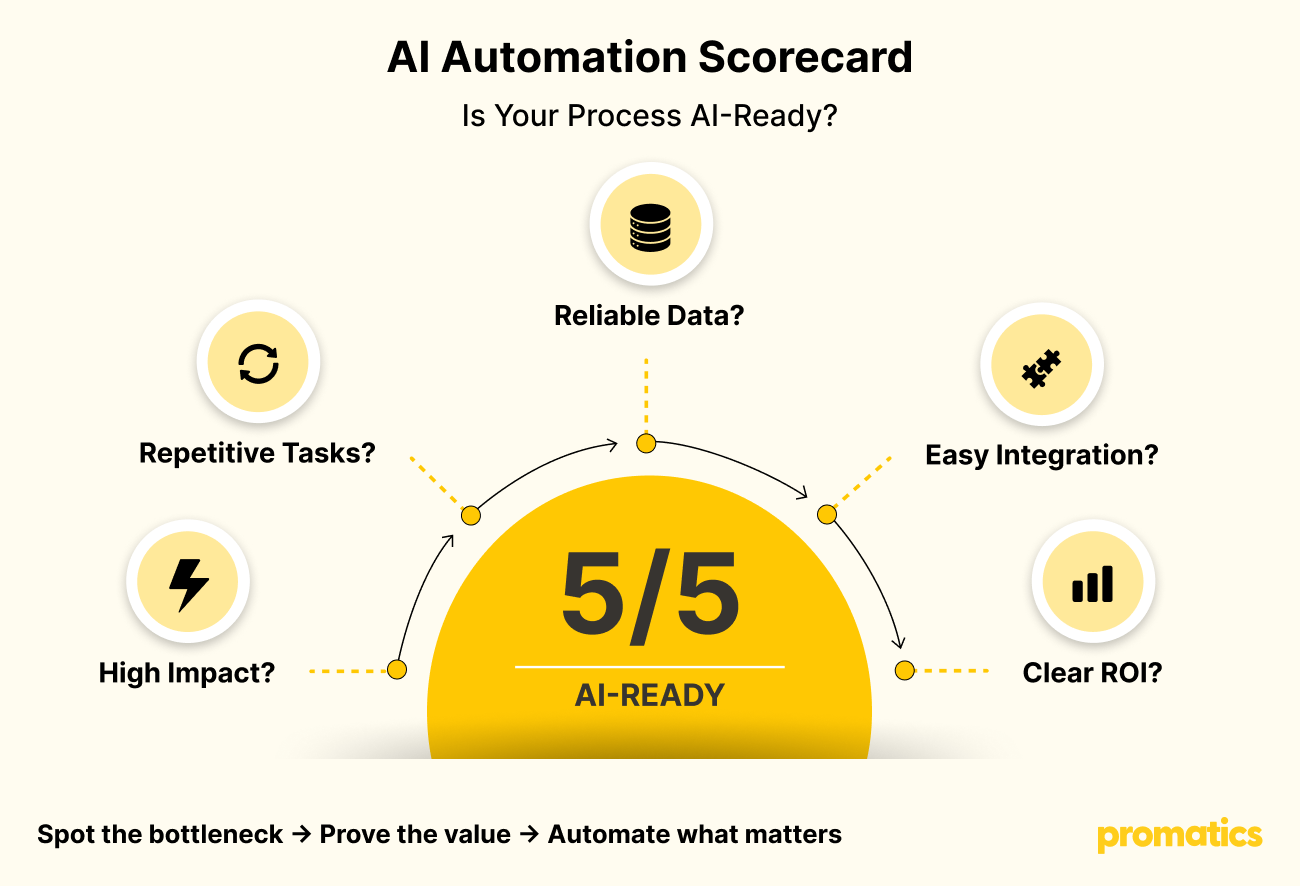
Evaluate each potential workflow against five questions:
1. Does It Have High Business Impact?
Look for processes affecting revenue, operating costs, customer experience, productivity, or risk.
2. Is the Work Repetitive?
Repeated tasks are usually easier to automate than highly unpredictable processes.
3. Is the Data Available?
AI needs relevant and usable data to produce reliable results.
4. Can It Be Integrated?
The solution should work with the CRM, ERP, databases, APIs, or other systems already used by your organization.
5. Can ROI Be Measured?
You should be able to compare performance before and after automation.
High impact + repetitive workflow + usable data + integration potential + measurable ROI = strong AI automation candidate.
How Do You Calculate AI Automation ROI?
AI ROI should be connected to business performance rather than AI usage alone.
Start by measuring the existing process.
Track:
Cost
How much does the current process cost?
Time
How long does each transaction or task take?
Productivity
How much employee effort is required?
Accuracy
How frequently do errors or rework occur?
Revenue
Can automation increase conversions, sales capacity, or retention?
Customer Experience
Can response or resolution times improve?
A simple framework is:
Current Process Cost − Automated Process Cost = Direct Savings
Then add measurable revenue or productivity gains where applicable.
The most important rule is simple:
Establish the baseline before deploying AI.
Without a baseline, proving ROI becomes difficult.
What Data Does AI Automation Need?
AI automation can work with many types of business information, including:
- Customer records
- Transactions
- Documents
- Product information
- Support conversations
- Operational data
- Sensor data
- Historical outcomes
But data volume isn’t enough.
Businesses should evaluate:
Accuracy + Completeness + Relevance + Consistency + Accessibility
If important information is spread across multiple systems, data integration may need to happen before AI deployment.
What Does an AI Automation Architecture Look Like?
A production-ready AI automation solution typically includes several connected layers:
Business Applications
CRM • ERP • HRMS • E-commerce • Internal Platforms
↓
Integration & Workflow Layer
APIs • Business Rules • Orchestration • Approvals
↓
AI Layer
LLMs • Machine Learning • NLP • Computer Vision • AI Agents
↓
Data Layer
Databases • Documents • Knowledge Bases
↓
Infrastructure Layer
Cloud • Security • Monitoring • Governance
AI is therefore not simply a model.
It is a complete business system that must work reliably with data, software, users, security controls, and operational processes.
For organizations preparing AI workloads for production, cloud infrastructure and DevOps can support deployment, scalability, monitoring, and reliability.
AI Business Automation Trends to Watch
AI Agents Are Moving From Assistance to Action
The shift is happening from:
AI that answers
to:
AI that acts.
Agents can increasingly participate in multi-step business workflows while operating within defined permissions and controls.
AI Is Becoming Part of Existing Software
Businesses don’t always need a standalone AI platform.
AI can be embedded into:
- Mobile applications
- SaaS products
- CRM systems
- ERP platforms
- Customer portals
- Enterprise applications
This makes AI part of the workflow instead of another destination employees need to visit.
Industry-Specific AI Is Becoming More Valuable
Generic AI can solve common problems.
Custom AI solutions can combine:
Business data + industry knowledge + proprietary workflows + AI
This can create more relevant and defensible business applications.
AI Governance Is Becoming Essential
As AI takes on more operational responsibility, businesses need controls around:
- Data access
- Security
- Privacy
- Human approval
- Model monitoring
- Auditability
- Responsible AI usage
The more critical the workflow, the more important these controls become.
From AI Idea to Business ROI
1. Identify the Problem
↓
2. Establish the Baseline
↓
3. Assess Data & Systems
↓
4. Select the AI Approach
↓
5. Build a Proof of Concept
↓
6. Integrate With Business Systems
↓
7. Measure Results
↓
8. Scale the Solution
Start Small. Prove Value. Scale What Works.
A focused AI proof of concept can help businesses validate technical feasibility and commercial value before committing to a larger deployment.
Build or Buy AI Automation?
Not every business needs to build AI from scratch.
Use Existing AI Models When:
- The use case is relatively standard
- A suitable model already exists
- Speed to market is important
- Extensive customization isn’t required
Consider Custom AI Development When:
- Your business has proprietary data
- The workflow is highly specialized
- Existing models don’t meet accuracy requirements
- AI is part of a core product
- You need greater control over the solution
Choose a Hybrid Approach When:
- General-purpose AI handles language or reasoning
- Custom models handle specialized predictions
- Enterprise data provides business context
- Existing software manages the operational workflow
The right decision depends on business requirements, data, security, integrations, scalability, and expected ROI.
How to Successfully Implement AI Business Automation
A successful AI automation project should not jump directly from idea to deployment.
Follow a structured process:
Discover
Identify high-value workflows and define the business problem.
Assess
Review data, systems, integrations, security, and technical requirements.
Prototype
Build a focused proof of concept around a measurable use case.
Integrate
Connect AI with the applications and workflows employees already use.
Pilot
Test with real users and real business data.
Measure
Compare results with the original baseline.
Scale
Expand the solution once the business case is proven.
This approach reduces unnecessary investment while creating a clear path toward production.
Common AI Automation Mistakes to Avoid
Automating Without a Business Case
An impressive AI feature isn’t necessarily a valuable business solution.
Using AI Where Simple Automation Is Better
A rules engine or API may be more efficient for predictable workflows.
Ignoring Data Quality
Poor-quality data can undermine AI performance.
Building AI in Isolation
Disconnected AI can create another manual process rather than eliminating one.
Giving AI Unlimited Autonomy
Critical workflows may require permissions, approval steps, monitoring, and human oversight.
Measuring AI Usage Instead of Business Results
The number of AI interactions doesn’t prove ROI.
Always ask:
Did the process become faster, cheaper, more accurate, or more scalable?
Why Work With an AI Development Company?
Turning an AI concept into a reliable business system requires more than access to an AI model.
Depending on the project, businesses may need:
- AI consulting
- AI/ML development
- Generative AI
- RAG implementation
- AI agents
- Workflow automation
- API integrations
- CRM and ERP integration
- Data engineering
- Cloud deployment
- Security
- Testing
- Monitoring
- AI optimization
An experienced AI development company can help connect these components into a solution designed around the organization’s actual business processes.
The goal should be:
Business problem → AI solution → Working workflow → Measurable outcome
Why Choose Promatics Technologies?
Choosing an AI development partner is ultimately a business decision.
You need a team that can understand the problem, evaluate the technology, build the solution, integrate it into your existing environment, and support it as the business scales.
Promatics Technologies provides AI and software development capabilities covering:
- Artificial intelligence
- Machine learning
- Generative AI
- AI agents
- Workflow automation
- Predictive analytics
- NLP
- Computer vision
- Intelligent document processing
- Enterprise integrations
- Cloud and DevOps
The focus is on developing practical AI solutions that fit real business workflows, rather than adding AI simply for the sake of technology.
Is Your Business Ready for AI Automation?
Before investing in an AI automation project, answer these questions:
- Which process creates the biggest operational bottleneck?
- How much does that process cost today?
- How much employee time does it consume?
- What data is available?
- Which systems need to be connected?
- What level of human oversight is required?
- What KPI will define success?
- What will implementation and ongoing operation cost?
- Can the solution scale across teams, locations, or markets?
If the answers point toward a clear opportunity, the next step is not necessarily a large AI transformation.
Start with one workflow. Build a measurable business case. Prove the value. Then scale.
Turn AI Potential Into Business Performance
AI business automation is no longer about asking whether your company should use AI.
The more important question is:
Where can AI create measurable business value?
The answer could be a support workflow that takes hours to manage, a document process that consumes employee time, a sales operation that needs better prioritization, or an enterprise workflow that requires multiple systems to work together.
The winning approach is practical:
Find the bottleneck. Choose the right AI. Connect it to the workflow. Measure the result. Scale what works.
Ready to Turn an AI Automation Opportunity Into a Production-Ready Solution?
Explore Promatics’ AI development services or talk to the Promatics team about building an AI-powered solution for your business.
