React Native AI App Development: Building Scalable, Intelligence-Driven Apps

TL;DR
- React Native can be used to build AI-powered applications for both iOS and Android.
- AI capabilities can include conversational assistants, recommendations, computer vision, voice AI, predictive analytics, content generation, and AI agents.
- React Native should generally act as the application layer, while AI inference and orchestration are handled through backend, cloud, or on-device infrastructure.
- The best architecture depends on latency, privacy, model size, cost, and business requirements.
- React Native's New Architecture is now enabled by default and provides improved JavaScript-to-native communication and modern rendering capabilities.
AI is raising the bar for mobile apps. Users now expect more than basic features and simple interactions. They want apps that understand their needs, deliver personalized experiences, automate everyday tasks, create useful content, and respond intelligently in real time.
The shift toward AI-powered mobile experiences is already underway. Generative AI mobile applications recorded 3.3 billion downloads globally in 2024, representing 26% year-over-year growth, according to Sensor Tower data reported by The Economic Times.
At the same time, businesses are increasing their investment in AI. McKinsey reports that 92% of companies plan to increase their AI investments over the next three years, although only 1% currently consider themselves mature in AI deployment.
This creates an important opportunity for businesses building their next mobile product: AI should not be treated as an isolated chatbot or add-on feature. It should be considered part of the application’s core architecture.
For companies targeting both iOS and Android, React Native provides a strong foundation for building these experiences with a shared codebase while still allowing access to native capabilities.
This guide explores how React Native AI app development works, what AI features businesses can build, how to design a scalable architecture, what challenges to consider, and how to approach development strategically.
What Is React Native AI App Development?
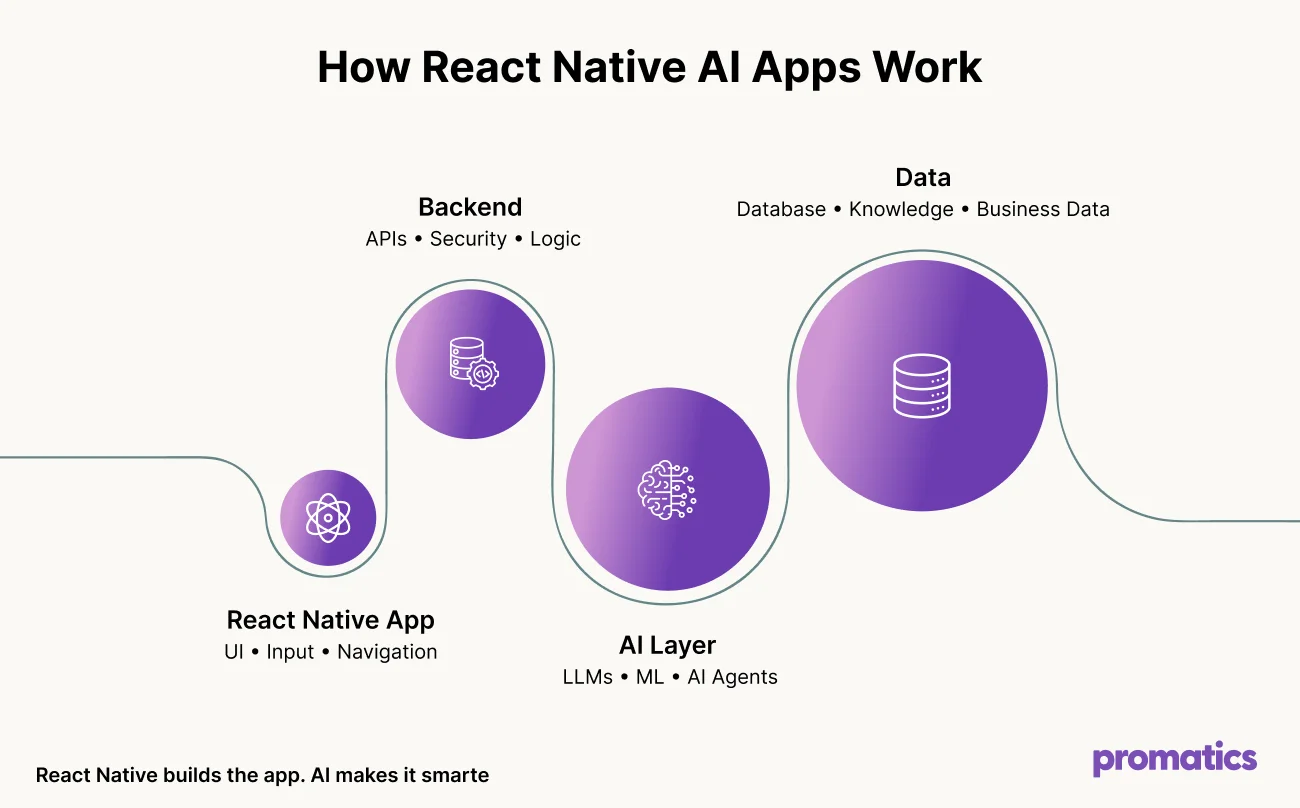
React Native AI app development involves using React Native as the mobile application framework while integrating artificial intelligence or machine learning capabilities into the product.
React Native typically manages the user-facing experience, including:
- Mobile UI
- Navigation
- Authentication
- State management
- Device interactions
- Notifications
- User input
- AI response rendering
The AI layer can provide capabilities such as:
- Natural language processing
- Generative AI
- Recommendations
- Image recognition
- Speech recognition
- Predictive analytics
- Semantic search
- Personalization
- Intelligent automation
- AI agents
For example, an eCommerce application could use React Native for its mobile interface while AI analyzes customer behavior, recommends products, answers questions, and generates personalized shopping experiences.
The key point is that React Native is the application foundation, not the AI model itself.
AI capabilities can be connected through APIs, backend services, native modules, cloud infrastructure, or on-device models depending on the use case.
What Is React Native AI App Development?
Quick answer:
React Native AI app development is the process of building AI-powered mobile applications with React Native while connecting AI models and services through backend, cloud, native, or on-device infrastructure.
React Native manages the user-facing experience, including:
- Mobile UI
- Navigation
- Authentication
- State management
- Device interactions
- Notifications
- User input
- AI response rendering
The AI layer can provide:
- Natural language processing
- Generative AI
- Recommendations
- Image recognition
- Speech recognition
- Predictive analytics
- Semantic search
- Personalization
- Intelligent automation
- AI agents
For example, an eCommerce app can use React Native for its mobile interface while AI analyzes customer behavior, recommends products, answers questions, and creates personalized shopping experiences.
The key distinction is simple: React Native powers the mobile experience, while AI provides the intelligence behind it.
AI capabilities can then be connected through APIs, backend services, native modules, cloud infrastructure, or on-device models based on the application’s requirements.
Why Is React Native a Strong Choice for AI-Powered Mobile Apps?
AI applications often need to move quickly from prototype to production. They also need to work consistently across multiple devices.
React Native can help businesses address both requirements.
1. One shared mobile development foundation
React Native allows developers to build applications for iOS and Android using a largely shared codebase.
This can be particularly useful for AI applications because many AI-related interfaces are platform-independent.
For example, the same underlying implementation can support:
- AI chat interfaces
- Personalized feeds
- Recommendation cards
- AI-generated content
- Conversational search
- User profiles
- AI dashboards
Platform-specific functionality can still be implemented using native modules when required.
Businesses considering cross-platform development can also compare React Native with native technologies in this React Native vs Swift comparison guide.
2. Access to Native Device Capabilities
Many AI applications depend on smartphone hardware.
A computer vision app may need camera access. A voice assistant requires microphone and audio capabilities. A fitness app may use motion sensors or other device data.
React Native allows businesses to combine a shared cross-platform application layer with native capabilities where needed.
3. A Modern Architecture for AI Experiences
React Native 0.76 introduced the New Architecture as the default, bringing improvements to native modules, rendering, event handling, and JavaScript-to-native communication.
For AI-powered applications, this matters because advanced experiences can involve frequent interaction between the application layer and native functionality.
4. Faster Product Iteration
AI products evolve quickly.
An app may start with a simple AI assistant and later add:
- Voice interaction
- Image understanding
- Personalized recommendations
- AI search
- Automated workflows
- Agentic features
A shared mobile foundation can make it easier to evolve the product while allowing the AI layer to change independently.
What AI Features Can You Add to a React Native App?
Quick answer:
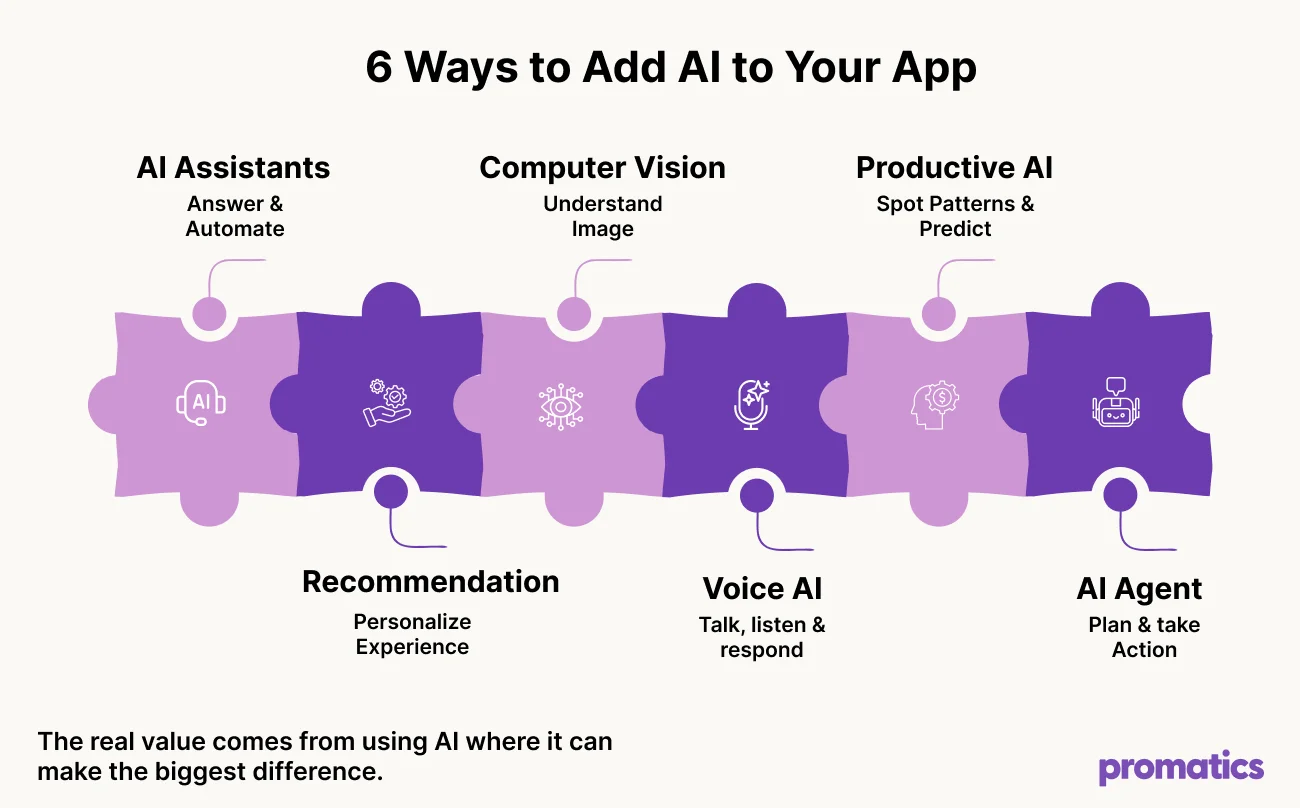
Businesses can add AI assistants, recommendations, computer vision, voice AI, predictive analytics, and AI agents to React Native applications
AI can add value to React Native apps in several practical ways.
AI Chatbots and Virtual Assistants
Conversational AI is one of the easiest ways to introduce intelligence into a mobile product.
Instead of navigating multiple menus, users can simply describe what they need.
For example:
“Find me running shoes under $100 that are suitable for long-distance running.”
An AI assistant can interpret the request, retrieve relevant information, apply filters, and return personalized results.
Potential applications include:
- Customer support
- Banking
- Education
- Travel
- Healthcare
- Retail
- Productivity
- Financial services
For production applications, AI provider credentials should be managed securely through a backend rather than exposed directly inside the mobile application.
AI-Powered Recommendations
Recommendation systems can analyze behavior, preferences, purchase history, search patterns, and contextual signals.
They can power:
- Product recommendations
- Content suggestions
- Personalized learning
- Fitness plans
- Travel recommendations
- Entertainment feeds
The React Native layer presents these recommendations while backend services handle data processing and model inference.
Computer Vision
AI combined with a smartphone camera can create powerful mobile experiences.
Examples include:
- Document scanning
- Object detection
- Product identification
- Visual search
- Receipt analysis
- Image classification
- Quality inspection
Depending on the model and privacy requirements, inference can happen locally on the device or through cloud infrastructure.
Voice AI
Voice interfaces can make AI applications more natural.
A typical architecture looks like:
Voice Input → Speech-to-Text → AI Model → Response → Text-to-Speech → Voice Output
This can be useful for:
- Virtual assistants
- Accessibility features
- Hands-free applications
- Automotive apps
- Healthcare applications
- Productivity tools
Predictive AI
Not every AI experience needs a chatbot.
Predictive models can work silently in the background and provide users with useful insights.
Examples include:
- Customer churn prediction
- Fraud detection
- Demand forecasting
- Predictive maintenance
- Lead scoring
- Delivery prediction
- Risk assessment
This type of AI can directly support business decision-making without requiring users to interact with a conversational interface.
AI Agents
AI agents go beyond generating responses.
They can understand an objective, choose tools, retrieve information, perform actions, and evaluate results.
For example, a travel app could use an AI agent to understand a trip request, gather approved travel information, build an itinerary, recommend activities, organize the schedule, and execute approved actions.
Think Beyond AI
The real value comes from using AI where it can make the
How Does a React Native AI App Architecture Work?
Quick answer:
A scalable React Native AI app typically separates the mobile experience, backend APIs, AI orchestration, AI models, and data layer. This makes the application easier to secure, scale, monitor, and evolve.
A simplified architecture looks like:
React Native App
↓
API / Backend Layer
↓
AI Orchestration Layer
↓
LLMs / ML Models / AI Services
↓
Database + Vector Storage + Business Systems
Each layer has a specific responsibility.
Layer 1: React Native Application
Handles:
- UI
- Navigation
- Authentication
- User input
- AI response rendering
- Streaming responses
- Local storage
- Device permissions
- Notifications
Layer 2: Backend API
The backend provides a secure connection between the mobile application and AI services.
It can manage:
- Authentication
- Authorization
- Business logic
- API requests
- Rate limiting
- AI provider credentials
- Usage tracking
Layer 3: AI Orchestration
The AI orchestration layer decides how each request should be processed.
It can determine:
- Which model to use
- Which prompt to execute
- Whether more context is needed
- Which tools an agent can access
- Whether information should be retrieved
- Whether a fallback model is required
Layer 4: AI Models
Different tasks may require different models.
For example:
- LLMs for conversations
- Vision models for images
- Speech models for voice
- Recommendation models for personalization
- Embedding models for semantic search
- Predictive models for forecasting
Using the right model for each task can help control cost and latency.
Layer 5: Data and Knowledge Layer
AI applications may need access to:
- Product catalogs
- Customer information
- Internal documents
- FAQs
- Knowledge bases
- Transaction records
- User preferences
RAG, or Retrieval-Augmented Generation, connects AI models with relevant business data so applications can retrieve useful information before generating a response.
Businesses can explore the broader architecture behind these experiences in this Generative AI App Development Guide.
Cloud AI vs On-Device AI vs Hybrid AI
Quick answer:
Cloud AI is suited to powerful, complex workloads. On-device AI works well for low-latency or offline use cases. Hybrid AI combines both approaches to balance performance, privacy, cost, and scalability.
Cloud AI
Best for: Large models, complex reasoning, image generation, and advanced AI workflows.
Pros: Powerful models • Centralized updates • Easier monitoring
Cons: Network dependency • API costs • Latency
On-Device AI
Best for: Lightweight models, offline experiences, low-latency processing, and selected privacy-sensitive tasks.
Pros: Faster response • Offline capability • Reduced network dependency
Cons: Device limitations • Model size • Battery usage
Hybrid AI
Best for: Applications that need a balance between cloud intelligence and local processing.
Example:
On-device image preprocessing + Cloud image analysis
The right choice depends on cost, latency, privacy, connectivity, model size, and business requirements.
How Do You Build a Scalable React Native AI App?
Quick answer:
Start with a clear business problem, separate AI from the mobile layer, design for streaming, control AI usage, and continuously monitor performance and cost.
1. Start With a Specific Business Problem
Don’t add AI simply because competitors are doing it.
Ask:
- What problem does AI solve?
- Who benefits?
- What data does it need?
- What happens when AI is wrong?
- How will success be measured?
The strongest AI products usually solve one meaningful problem well before expanding into multiple AI features.
2. Keep AI Independent From the Mobile Layer
Avoid tightly connecting the React Native app to one model provider.
A flexible architecture should allow businesses to change:
Models • Providers • Prompts • Workflows • Routing
3. Design for Streaming
AI responses can take longer than traditional API requests.
Streaming lets users see responses as they are generated, improving the perceived responsiveness of the app.
4. Use Caching Intelligently
Caching suitable requests can help reduce:
API costs • Response time • Backend load
Sensitive or highly personalized information should be handled carefully.
5. Add Rate Limits and Usage Controls
AI usage can become expensive at scale.
Usage controls can be based on:
User • Subscription • Feature • Requests • Tokens • Daily limits
6. Monitor AI Performance
Traditional application monitoring is not enough.
Track:
- Response latency
- Model errors
- Token usage
- AI infrastructure costs
- User feedback
- Task completion
- Output quality
- Failure rates
The goal is not just to make AI work. It is to measure whether AI is delivering real value.
What Security Measures Should React Native AI Apps Include?
Quick answer:
Secure React Native AI apps should protect API credentials, minimize data exposure, encrypt sensitive information, enforce access controls, and use AI guardrails.
Protect AI Credentials
Never store private AI provider API keys directly inside the mobile application.
Minimize Data Sent to AI Systems
Send only the information the model needs to complete the task.
Encrypt Sensitive Information
Use appropriate encryption for data in transit and at rest.
Implement Authentication and Authorization
AI features should follow the same access-control rules as the rest of the application.
Add AI Guardrails
Production AI applications should protect against:
- Prompt injection
- Unauthorized tool access
- Data leakage
- Malicious inputs
- Unsafe outputs
For high-impact workflows, human approval should be required before AI performs sensitive actions.
What Are the Common Challenges in React Native AI App Development?
AI Hallucinations
AI can generate inaccurate or fabricated information.
Use validation, retrieval, structured outputs, and guardrails where accuracy matters.
AI Infrastructure Costs
Model usage can become a significant operating expense.
Control costs through:
Model selection • Prompt optimization • Token management • Caching • Model routing
Latency
AI requests can take longer than traditional API calls. Streaming, caching, efficient backend architecture, and model selection can improve response times.
Data Privacy
Businesses need to understand what data is processed, where it is stored, and which AI services receive it.
Model Dependency
Depending entirely on one AI provider can create technical and commercial risks.
A modular AI architecture makes it easier to adopt new models as requirements change.
What Is the React Native AI App Development Process?
Quick answer:
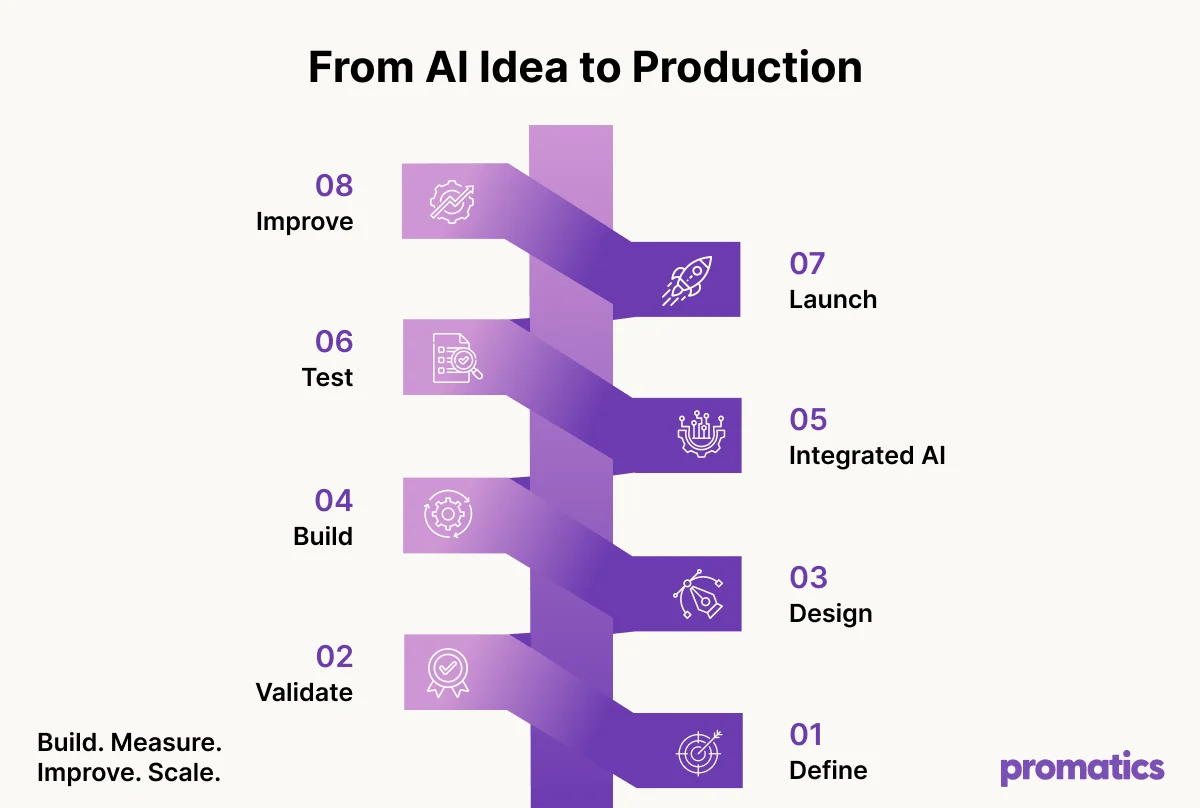
The process typically moves from use-case discovery and validation to architecture, development, AI integration, testing, optimization, and continuous improvement.
1. Define the AI use case
Identify the user and business problem.
2. Validate the AI concept
Test quality, accuracy, latency, cost, and feasibility.
3. Design the architecture
Choose cloud, on-device, or hybrid AI.
4. Design the user experience
Create interfaces around real user behavior.
5. Build the React Native app
Develop the cross-platform mobile experience.
6. Build the backend
Develop APIs, authentication, business logic, and AI orchestration.
7. Integrate AI
Connect models, prompts, retrieval, tools, or agents.
8. Test
Test software behavior and AI-specific scenarios.
9. Optimize
Monitor performance, cost, usage, and output quality.
10. Deploy and improve
Continuously evaluate and improve the application.
Build → Measure → Improve → Scale
How Much Does React Native AI App Development Cost?
Quick answer:
There is no fixed cost for React Native AI app development. The budget depends on app complexity, AI features, architecture, integrations, security requirements, and ongoing AI infrastructure.
A basic MVP may include:
- Authentication
- Basic UI
- React Native development
- Backend APIs
- One AI model
- Basic analytics
A more advanced application may require:
- Multiple AI models
- RAG
- Voice AI
- Computer vision
- AI agents
- Custom machine learning
- Real-time processing
- Enterprise security
- Advanced analytics
- Scalable cloud infrastructure
A practical cost structure is:
Discovery → UX/UI → React Native Development → Backend → AI Integration → Testing → Deployment → AI Infrastructure
Remember: AI costs continue after launch through model usage, APIs, cloud infrastructure, monitoring, and maintenance.
Is React Native a Good Choice for an AI App?
Quick answer:
React Native is a strong choice when you need iOS and Android apps, shared functionality, frequent updates, API-driven AI features, and access to native device capabilities.
It is worth considering when:
- You need both iOS and Android apps
- A large portion of functionality can be shared
- The product requires frequent updates
- AI features are primarily API-driven
- The app needs camera, microphone, location, or other native capabilities
Native development may still be better for highly specialized platform requirements or extremely demanding native workloads.
The right choice should ultimately depend on the product’s technical and business requirements.
The Future of React Native AI App Development
The next generation of mobile applications will likely use AI less as a standalone feature and more as an underlying capability.
Instead of opening a chatbot separately, users may encounter intelligence throughout the application.
- Search can become conversational.
- Recommendations can become predictive.
- Forms can become intelligent.
- Customer support can become proactive.
- Notifications can become personalized.
- Business workflows can become agent-driven.
This shift is already visible in the growing adoption of AI-powered mobile applications. The 3.3 billion generative-AI app downloads recorded globally in 2024 show that users are increasingly willing to interact with AI through mobile experiences.
At the infrastructure level, React Native is also evolving. The New Architecture is now the default, and React Native’s documentation describes it as production-ready and already proven at scale in Meta’s applications.
The result is an increasingly capable foundation for building mobile products where AI is deeply integrated into the experience.
Conclusion
Build an AI App That Delivers Real Value. AI is not just about adding a chatbot to your app. The real value comes from using AI to make your product smarter, more personalized, and easier to use.
At Promatics Technologies, we help businesses build React Native AI apps that combine intelligent features with reliable technology, secure data, and scalable architecture.
Whether you are starting a new AI app or adding AI to an existing product, our team can help you turn your idea into a production-ready solution. Have an AI app idea? Let’s build a smarter, scalable mobile experience togethe.
